Have your Instagram posts suddenly stopped reaching people even though your content quality hasn’t changed? You’re not alone. Many creators notice a sharp drop in impressions, fewer Reel views, and almost no engagement without understanding what went wrong.
The good news is that instagram shadowban recovery is possible when you identify the real cause and fix unhealthy account signals. A sudden reach drop doesn’t always mean Instagram has punished your account. Sometimes it’s caused by content fatigue, weak engagement signals, restricted hashtags, or changes in the algorithm. Read our detailed guide on [Why Is My Instagram Reach Down? Simple Fixes to Boost Engagement ] to rule out basic algorithm issues.”
In this guide, you’ll learn how to identify shadowban symptoms, check your account health, remove possible restrictions, and follow a practical 14-day recovery plan. Whether you’re a creator, blogger, or small business owner, these steps will help you rebuild organic reach and create a safer content strategy.
Let’s break down what’s actually happening and what you can do about it.
What Is an Instagram Shadowban and Dead Reach?
An Instagram shadowban happens when your content visibility decreases without a clear notification from Instagram. Your posts may still appear on your profile and to followers, but Instagram may limit how often it shows your content to non-followers through Explore, hashtags, or recommendations.
Simply put, your account isn’t completely blocked. Your reach is restricted.
Many creators misunderstand this situation and assume their account is permanently damaged. That’s usually not true. A reach decline can happen because of several factors, including algorithm changes, low engagement signals, or content that triggers automated review systems.
How shadowban affects your account
When your account faces reduced visibility, you may notice:
- Your Instagram Reels views suddenly drop
- Hashtag reach becomes extremely low
- New followers stop discovering your content
- Engagement rate decreases despite similar posting frequency
- Posts receive fewer impressions from non-followers
For example, a creator who normally gets 10,000 Reel views might suddenly receive only 500–700 views. That doesn’t automatically confirm a shadowban, but it signals that something needs investigation.
💡 Pro Tip:
Don’t panic and delete your entire account after a reach drop. First, check your account health and content signals.
Shadowban vs normal algorithm changes
Here’s where it gets interesting. Not every reach decline is a shadowban.
| Problem | Possible Reason | Recovery Approach |
| Low Reel views | Weak hook or audience fatigue | Improve content strategy |
| Low hashtag reach | Restricted hashtags or spam signals | Clean hashtag usage |
| Sudden visibility drop | Account restriction signals | Review account health |
| Lower engagement | Audience interest changed | Test new formats |
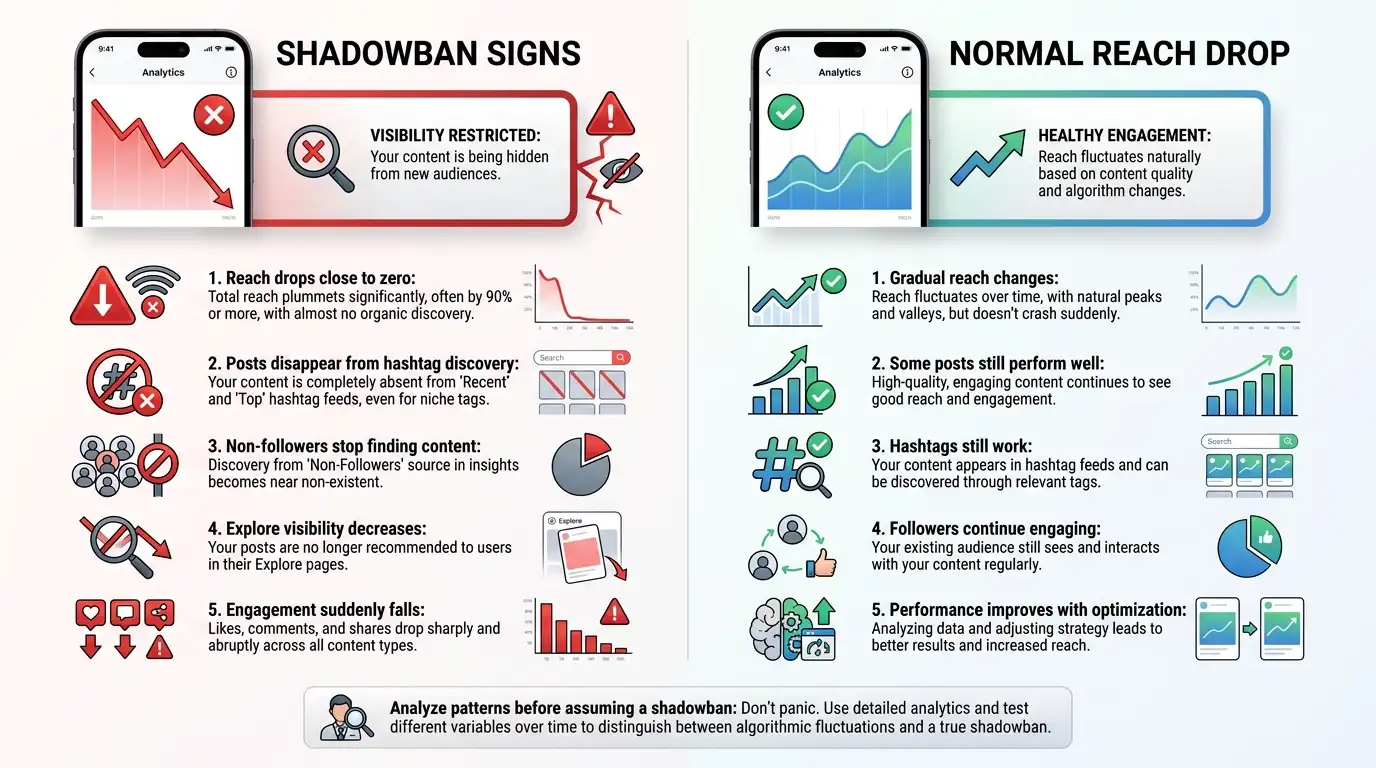
The truth is, Instagram’s algorithm constantly evaluates user behavior. A temporary decline doesn’t always mean your account has received an algorithm penalty.
Why Did Your Social Media Reach Suddenly Drop?
Your Instagram reach can suddenly decrease because of algorithm updates, changes in audience behavior, content quality issues, or account activity that Instagram considers suspicious.
Before trying any fix, understand the reason behind the drop. Otherwise, you may waste time making changes that don’t solve the actual problem.
Common reasons behind reach drops
1. Algorithm updates
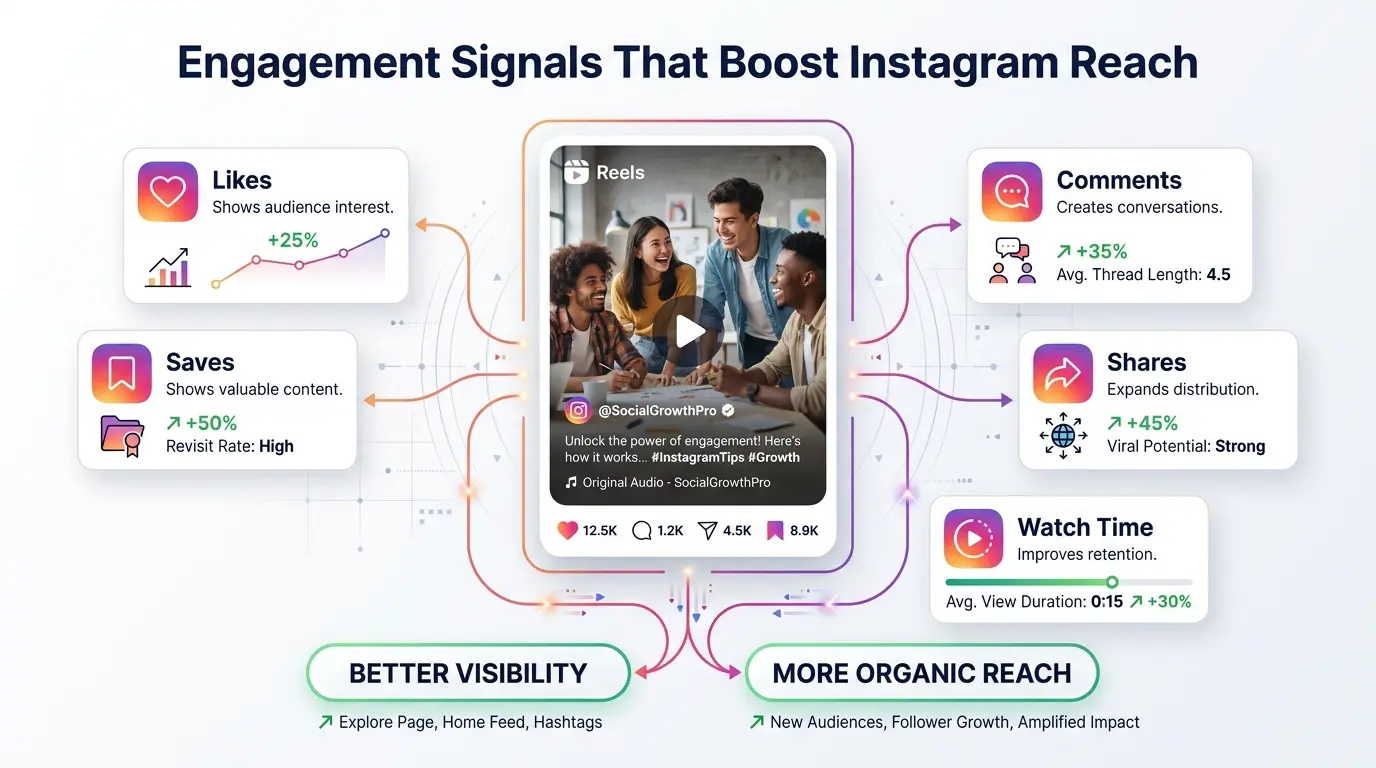
Instagram frequently changes how it ranks content. The platform now focuses heavily on:
- Watch time
- Saves
- Shares
- Meaningful comments
- Original content signals
A strategy that worked six months ago may not perform the same today.
2. Low audience engagement
Instagram watches how people interact with your posts. If users quickly scroll past your content, the algorithm may reduce distribution.
For example:
A Reel with 50,000 impressions but poor watch time may get pushed less than a smaller Reel where viewers watch until the end.
3. Repetitive or recycled content
Posting the same style repeatedly can reduce audience interest.
Try mixing:
- Educational posts
- Behind-the-scenes content
- Personal stories
- Tutorials
- Short-form videos
Other possible causes
Your reach may also drop because of:
- Using banned or restricted hashtags
- Posting too aggressively
- Using automation tools
- Buying followers or engagement
- Receiving multiple content reports
- Violating Instagram community guidelines
⚠️ Warning:
Third-party follower growth apps are risky. Many use fake engagement methods that damage account trust signals.
Check If Your Account Is Shadowbanned Right Now
The easiest way to check whether your account is affected is by reviewing Instagram’s built-in account health tools and comparing your current performance with previous content.
Instagram doesn’t provide an official “shadowban checker,” but you can identify warning signs through analytics.
Step-by-step shadowban diagnosis
Follow these steps:
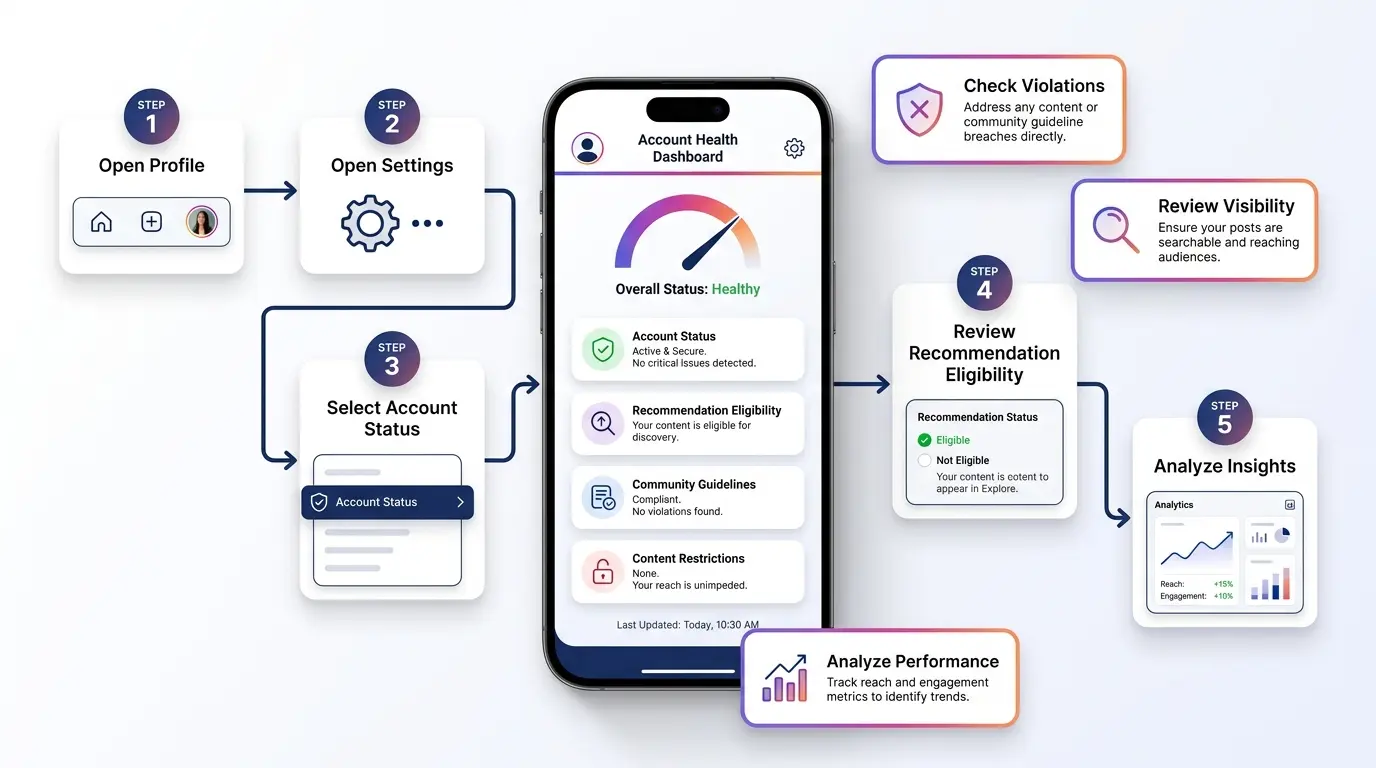
Step 1: Check Account Status
Open:
- Instagram app
- Profile section
- Settings
- Account Status
Look for:
- Removed content notices
- Recommendation eligibility issues
- Community guideline warnings
If Instagram shows restrictions, fix those issues first.
Step 2: Test hashtag visibility
Create a simple test:
- Publish a normal post
- Use a few relevant hashtags
- Ask someone who doesn’t follow you to search those hashtags
If your post doesn’t appear, your hashtag distribution may be limited.
Step 3: Review Instagram Insights
Check:
- Reach from non-followers
- Profile visits
- Post impressions
- Reel discovery sources
A sudden drop in non-follower reach often indicates visibility problems.
Signs your Instagram account may be shadowbanned
Common signals include:
- Reach drops suddenly without content changes
- Hashtag impressions disappear
- Reels stop appearing in recommendations
- New followers decline sharply
- Engagement comes only from existing followers
But remember, these signs can also happen because of audience fatigue or weaker content performance.
📝 Note:
A single low-performing post doesn’t mean you’re shadowbanned. Look for patterns across multiple posts.
Instagram Shadowban Recovery: Remove Restrictions
instagram shadowban recovery starts with cleaning your account signals and rebuilding trust with Instagram’s algorithm.
The goal isn’t to “trick” Instagram. The goal is to show normal, authentic user behavior again.
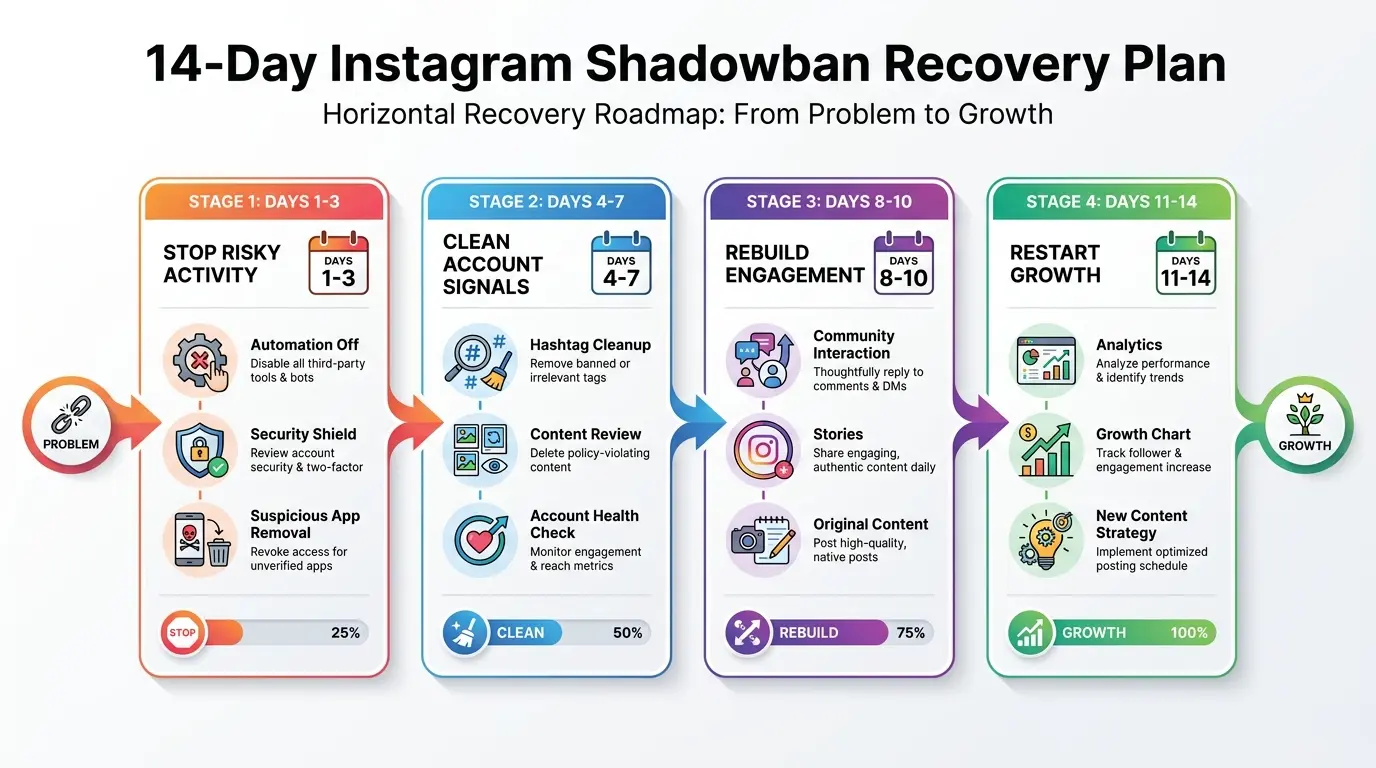
Follow this 14-day recovery protocol
Days 1–3: Stop harmful activities
During the first few days:
- Avoid mass liking or following accounts
- Stop using automation tools
- Remove suspicious third-party apps
- Avoid copying viral spam tactics
Give your account time to stabilize.
Days 4–7: Clean your content signals
Review your recent posts.
Remove or archive content that:
- Uses questionable hashtags
- Looks spammy
- Contains misleading engagement requests
- Violates community guidelines
Don’t delete hundreds of posts at once. Large activity spikes can look unnatural.
Days 8–14: Restart healthy engagement
Focus on real interaction:
- Reply to comments
- Engage with followers
- Share valuable Stories
- Post original Reels
- Encourage conversations
Instagram wants to see genuine community activity.
Does deleting posts fix an Instagram shadowban?
Usually, deleting posts alone won’t remove restrictions.
Deleting everything can actually hurt because you lose existing engagement data and content history.
A better approach is:
- Archive problematic posts
- Remove risky hashtags
- Improve future content quality
- Maintain consistent activity
🔥 Quick Tip:
Take screenshots of your Instagram Insights before making changes. This helps you measure whether your recovery strategy works.
Best Practices to Avoid Future Algorithm Penalties
The best way to handle an Instagram shadowban is to prevent it before it happens. A healthy account follows Instagram’s rules, creates valuable content, and builds real engagement instead of chasing shortcuts.
Instagram’s algorithm doesn’t punish accounts randomly. It looks for patterns that suggest spam, fake engagement, or poor user experience.
Build a safer content workflow
Follow these practices to protect your account:
1. Create original content
Instagram prefers content that adds something new. Avoid uploading:
- Watermarked videos from other platforms
- Copied captions repeatedly
- Low-quality recycled content
Instead, add your own:
- Voice
- Experience
- Editing style
- Personal examples
2. Maintain a realistic posting schedule
Posting too much in a short period can create unusual activity patterns.
A balanced schedule might include:
- 3–5 Reels per week
- Daily Stories
- 1–2 valuable feed posts weekly
Your ideal frequency depends on your audience and niche.
3. Follow Instagram community guidelines
Avoid content that may trigger moderation systems, including:
- Misleading claims
- Copyright violations
- Artificial engagement requests
- Spam comments
💡 Pro Tip:
Consistency beats volume. A smaller number of high-quality posts usually performs better than multiple rushed uploads.
Avoid suspicious engagement tactics
Many creators damage their accounts while trying to grow faster.
Avoid:
- Follow/unfollow methods
- Buying followers
- Comment bots
- Automated likes
- Engagement pods with fake activity
These methods may increase numbers temporarily, but they often reduce your long-term organic reach.
Fix Low Engagement and Boost Your Post Visibility
If your Instagram reach dropped, improving engagement signals should become your priority. Instagram uses user interactions as clues to decide whether your content deserves wider distribution.
The key signals include:
- Watch time
- Shares
- Saves
- Comments
- Profile visits
- Direct messages
Simply put, Instagram shows content that keeps people active on the platform.
Improve your Instagram Reel performance
To recover dead reach on Instagram Reels, focus on these areas:
Create stronger openings
The first few seconds decide whether viewers continue watching.
Instead of:
“Today I’m going to explain Instagram tips…”
Try:
“Your Instagram reach might be dropping because of this hidden mistake.”
The second version creates curiosity.
Encourage meaningful interactions
Avoid asking for empty engagement like:
“Comment YES if you agree.”
Instead, ask questions that create conversations:
- “Which Instagram feature do you use the most?”
- “What problem are you facing with your account?”
Real discussions create stronger engagement signals.
Improve content visibility
Try these strategies:
- Add searchable keywords in captions
- Use relevant hashtags
- Create save-worthy guides
- Answer audience questions
- Share content through Stories
📝 Note:
More hashtags don’t always mean more reach. Relevance matters more than quantity.
Clean Up Spammy Hashtags and Restricted Activities
Hashtag problems are one of the most common reasons creators suspect a shadowban. While hashtags alone usually don’t destroy an account, repeatedly using restricted or irrelevant hashtags can affect content visibility.
How to check problematic hashtags
Follow this process:
- Search each hashtag manually
- Check whether Instagram displays warnings
- Remove hashtags connected with spam activity
- Replace them with niche-specific alternatives
For example:
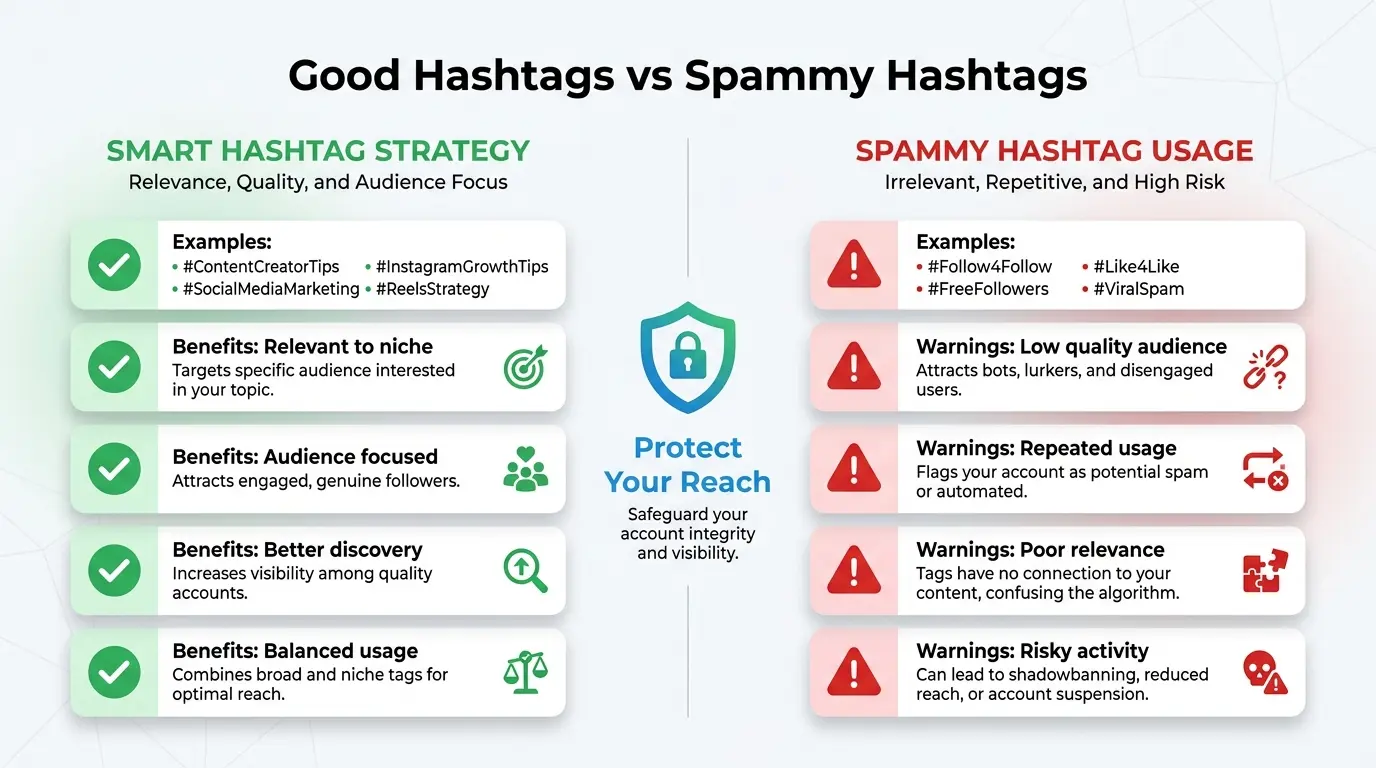
Instead of using extremely broad hashtags like:
- #viral
- #follow4follow
- #likes
Use targeted hashtags related to your audience:
- #InstagramGrowthTips
- #ContentCreatorTips
- #SmallBusinessMarketing
How to clear Instagram shadowban issues caused by hashtags
A safer hashtag strategy includes:
- Using 5–15 highly relevant hashtags
- Mixing large and small hashtags
- Avoiding the same hashtag group repeatedly
- Updating hashtags based on content topic
Avoid hashtag stuffing
Adding dozens of unrelated hashtags can confuse Instagram’s recommendation system.
Your hashtags should answer one question:
“Who would actually want to see this content?”
⚠️ Warning:
Don’t use trending hashtags just because they are popular. If they don’t match your content, they can attract the wrong audience and reduce engagement quality.
Rebuild Audience Engagement With Consistent Content
Recovering your reach isn’t only about fixing problems. It’s also about rebuilding trust with your audience.
Think of Instagram growth like a relationship. You can’t disappear for weeks and expect followers to stay highly engaged.
Create a 30-day content improvement plan
A simple strategy:
Week 1: Analyze
Review:
- Your top-performing posts
- Audience demographics
- Best posting times
- Content formats that worked
Week 2: Experiment
Test:
- New Reel formats
- Different hooks
- Educational content
- Story interactions
Week 3: Improve
Double down on content that gets:
- Saves
- Shares
- Longer watch time
Week 4: Optimize
Remove weak patterns and improve your workflow.
Use Stories to reconnect
Stories are powerful because they create direct interaction.
Try:
- Polls
- Questions
- Behind-the-scenes clips
- Product updates
- Quick tutorials
These actions tell Instagram that people actively care about your account.
Safe AI usage for content creation
AI tools can help creators work faster, but using them incorrectly may create low-quality content.
Good uses:
- Brainstorming ideas
- Improving captions
- Creating content calendars
- Analyzing trends
Avoid:
- Posting fully automated generic content
- Creating hundreds of similar captions
- Spamming AI-generated comments
💡 Pro Tip:
Use AI as an assistant, not a replacement for your personal voice. Your unique experience is what separates your content from thousands of similar posts.
Essential Tools to Monitor Social Media Health
Monitoring your account performance helps you identify problems before they become serious.
Instagram already provides several useful tools, but third-party analytics platforms can provide additional insights.
Native Instagram tools
The first tools you should use are:
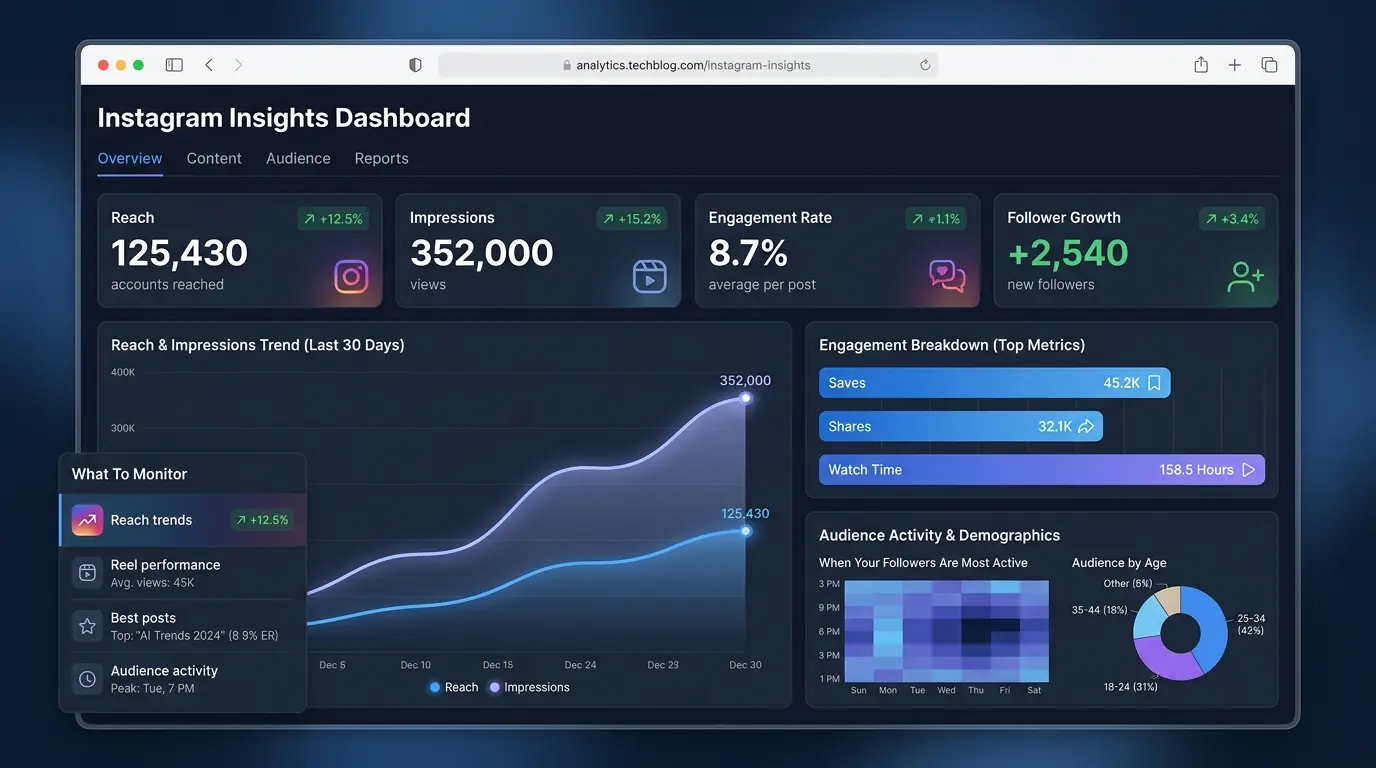
Instagram Insights
Useful for checking:
- Reach
- Impressions
- Engagement rate
- Audience activity
- Content performance
Account Status
Useful for checking:
- Recommendation eligibility
- Removed content
- Restrictions
Helpful analytics categories
Track these numbers regularly:
| Metric | Why It Matters |
| Reach | Shows content visibility |
| Saves | Indicates content value |
| Shares | Measures audience interest |
| Watch time | Shows Reel quality |
| Profile visits | Measures curiosity |
When testing recovery progress
Don’t judge results after one post.
A better approach:
- Compare 7-day performance
- Compare 30-day trends
- Look for gradual improvement
The truth is, algorithm recovery usually happens step by step. Overnight changes are rare.
Common Mistakes That Trigger Algorithm Penalties
Many creators accidentally hurt their own reach while trying to grow faster.
Avoid these common mistakes:
1. Changing your niche too often
If your audience follows you for technology tutorials but suddenly receives unrelated content, engagement may decrease.
Keep your content direction clear.
2. Using engagement bait repeatedly
Posts that constantly ask users to comment, like, or share without providing value can reduce trust.
Create content people naturally want to interact with.
3. Ignoring audience feedback
Your comments and messages contain valuable information.
Pay attention to:
- Questions people ask
- Problems they mention
- Topics they request
4. Making too many account changes quickly
Changing usernames, bios, deleting posts, and switching strategies all at once can make performance analysis difficult.
Make changes gradually.
5. Using unsafe third-party apps
Some apps request unnecessary account access.
Before connecting any tool, check:
- Permissions requested
- Reviews
- Company reputation
- Security practices
⚠️ Warning:
Never share your Instagram password with unknown growth services.
Frequently Asked Questions
What is an Instagram shadowban?
An Instagram shadowban refers to reduced content visibility where your posts may reach fewer non-followers than usual. Your account usually remains active, but Instagram may limit recommendations, hashtag discovery, or Explore exposure due to account signals, content issues, or policy concerns.
How do I know if my account is shadowbanned?
You can check by reviewing Instagram Account Status, analyzing your Insights, and testing hashtag visibility. Signs include sudden drops in non-follower reach, fewer Reel recommendations, and unusually low impressions across multiple posts. However, these signs can also happen because of normal algorithm changes.
How long does an Instagram shadowban last?
The duration varies depending on the cause. Some visibility issues improve within a few days after fixing problematic activity, while others may take several weeks. The best approach is removing risky behavior, following guidelines, and consistently posting quality content.
Can you recover dead reach on Instagram?
Yes, many creators recover dead reach by improving content quality, rebuilding engagement, cleaning hashtags, and maintaining consistent posting habits. Recovery usually requires patience because Instagram needs time to collect new performance signals.
Why did my Instagram reach suddenly drop?
Your Instagram reach may drop because of algorithm updates, lower engagement, audience changes, restricted hashtags, repeated content, or account activity that appears unnatural. Reviewing your analytics can help identify the actual reason.
Do banned hashtags cause Instagram shadowbans?
Restricted hashtags can affect content discovery, especially when repeatedly used. They are one possible factor behind reduced visibility, but they are not always the only cause. Use relevant hashtags and check them before adding them to posts.
How can I fix low engagement on Instagram Reels?
Improve your Reel hooks, create content your audience wants to save and share, increase storytelling quality, and respond to comments. Focus on watch time and meaningful interactions instead of chasing views alone.
Does deleting posts fix an Instagram shadowban?
Deleting posts usually doesn’t instantly remove visibility problems. A better approach is to archive problematic content, remove risky hashtags, and improve future posts. Mass deleting content may remove useful engagement history.
Are third-party apps responsible for shadowbans?
Some third-party apps can create risks if they use automation, fake engagement, or violate Instagram rules. Review connected apps regularly and remove any service you no longer trust.
How do I fix Instagram shadowban in 2026?
To fix Instagram shadowban issues in 2026, focus on account health checks, original content, authentic engagement, safe hashtag practices, and avoiding automation tools. Algorithm systems continue changing, so long-term healthy activity matters more than quick fixes.
Final Thoughts on Long-Term Social Media Growth
Recovering from an Instagram reach drop takes patience, testing, and the right strategy. A temporary visibility issue doesn’t mean your account is finished. With proper instagram shadowban recovery steps, you can rebuild content visibility, improve engagement signals, and create a healthier relationship with your audience.
Remember these key takeaways:
- Check your Account Status before assuming you’re shadowbanned.
- Remove risky activities, spammy hashtags, and unsafe third-party tools.
- Focus on original content, meaningful engagement, and consistent posting.
The bottom line is, Instagram rewards creators who provide real value. Shortcuts may look attractive, but sustainable growth comes from understanding your audience and improving your content strategy.
Follow the 14-day recovery process, monitor your analytics, and keep testing what works. Your reach can improve when you give Instagram positive signals again.
Ready to improve your Instagram performance? Start by checking your account health today and take the first step toward restoring your organic reach.
To effectively recover from a shadowban, it’s crucial to assess your account’s compliance with Instagram’s guidelines. Engage authentically with your audience by prioritizing quality interactions over quantity. By consistently delivering valuable content, you can re-establish trust with the platform and foster genuine connections. Stay committed to refining your approach, and you’ll see a resurgence in your visibility and reach.