Creating viral Instagram Reels and TikTok videos sounds easy until you actually sit down to make them. You need ideas, scripts, visuals, editing skills, captions, music, and the right format. But what if AI could handle most of that work for you?
The demand for the best free ai video generator for reels without watermark has grown quickly because creators want professional-looking short videos without paying expensive subscriptions or dealing with annoying logos on their exports.
Today, AI video tools can turn simple text prompts, images, or scripts into engaging vertical videos within minutes.Finding the best free ai video generator depends on your content goals, video quality requirements, and the type of short-form videos you want to create Some focus on realistic AI-generated scenes, while others work more like complete video editors with captions, templates, and voiceovers.
In this guide, we’ll compare the 7 best free AI video generators for Reels and TikTok based on free access, watermark policies, 9:16 vertical support, video quality, ease of use, and creator-friendly features.
You’ll learn:
- Which AI video tools offer free credits
- Which platforms export videos without watermarks
- The difference between text-to-video and AI editing tools
- How to create faceless Reels using AI
- Ready-to-use 9:16 AI video prompts
Before choosing any tool, remember one thing: “free” doesn’t always mean unlimited. Most platforms offer daily credits or limited generations, so picking the right tool depends on your content style.
Quick Comparison: Top Free AI Video Tools
The best AI video generator depends on what type of content you want to create. Some tools are better for realistic cinematic clips, while others are designed for fast social media editing.
Quick Comparison: Best Free AI Video Generator Tools
Free Credits and Watermark Export Table
| AI Tool | Best For | Video Type | 9:16 Support | Free Access | Watermark |
| Kling AI | Realistic AI scenes | Text/Image-to-video | Yes | Free credits | Depends on export settings |
| PixVerse AI | TikTok/Reels videos | Text-to-video | Yes | Daily credits | Usually free exports available |
| CapCut AI | Faceless content | AI editor + templates | Yes | Free features | Some templates may include watermark |
| Hailuo AI | Cinematic clips | Text-to-video | Yes | Free credits | Check current export rules |
| InVideo AI | Script videos | Script-to-video | Yes | Free plan | Free exports may include branding |
| Luma Dream Machine | Image animation | Image-to-video | Limited | Free credits | Export rules vary |
| Runway Gen-3 | Professional creators | Text/Image-to-video | Yes | Limited credits | Free plan limitations apply |
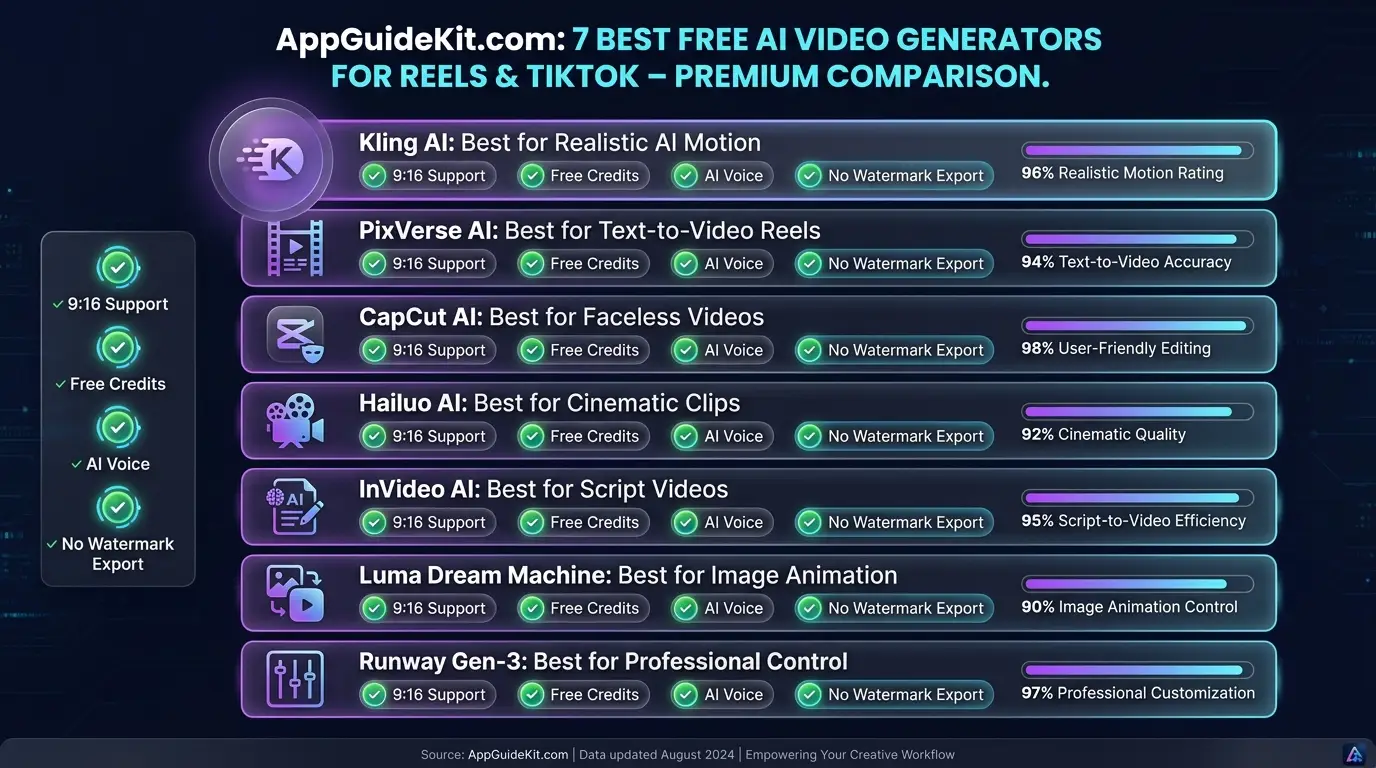
💡 Pro Tip: When choosing the best free ai video generator for reels without watermark, creators should compare video quality, export options, vertical support, and free usage limits.
How We Tested the Best Free AI Video Generator Options
Choosing an AI video tool only because it looks popular can waste your time. A platform might create beautiful demos but fail when you need daily Reel production. Our goal was to identify the best free ai video generator by comparing motion quality, free credits, export options, and social media features.
For this comparison, we looked at practical factors that matter to short-form creators.
Testing Criteria: 9:16 Support and Quality
Each tool was evaluated using these points:
1. Vertical Video Support
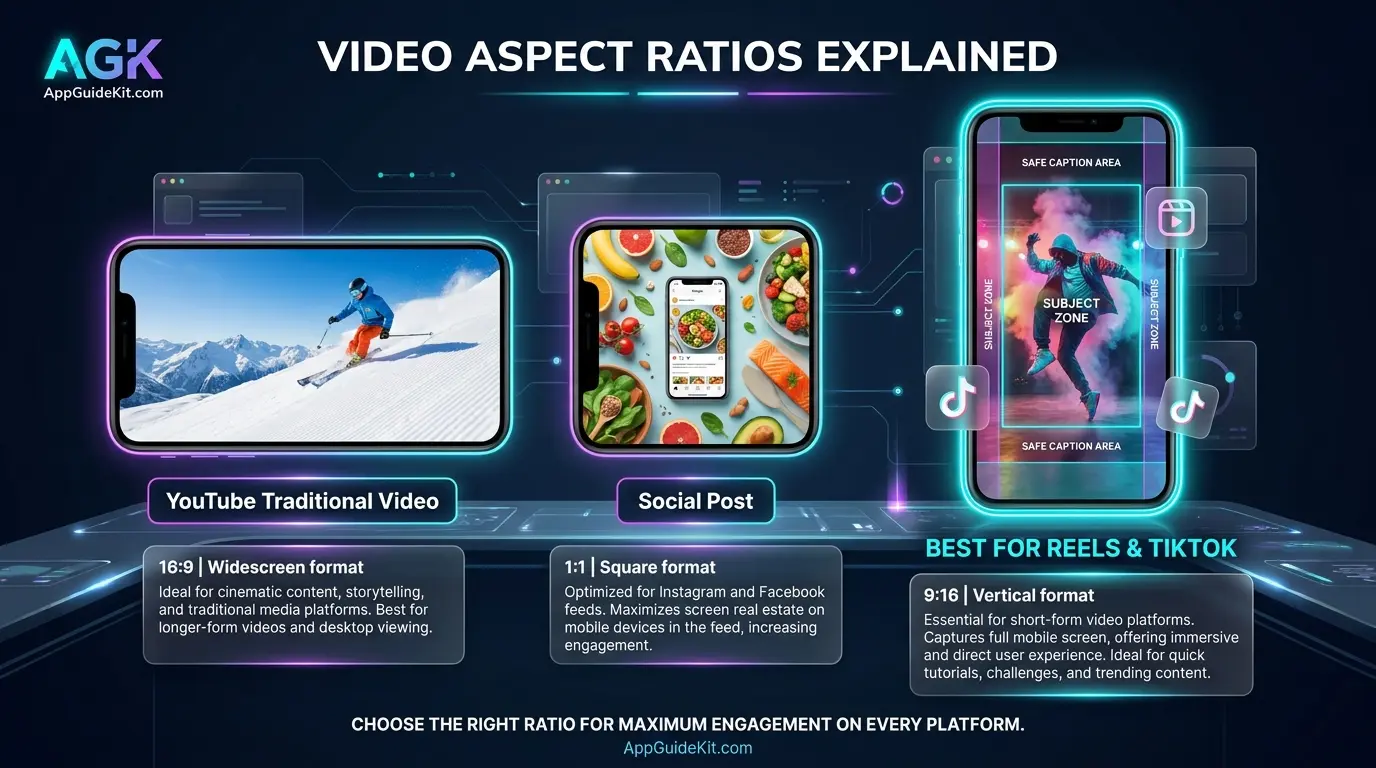
Instagram Reels and TikTok mainly use the 9:16 aspect ratio. A good AI video generator should allow vertical creation instead of forcing creators to crop landscape videos later.
Important checks:
- Native 9:16 generation
- Mobile-friendly exports
- Good quality after resizing
- Correct subject positioning
2. AI Motion Quality
A video can have amazing visuals but still look unnatural if movement is poor.
We checked:
- Character movement
- Camera motion
- Object consistency
- Realistic animations
- Scene transitions
3. Free Usage Limits
Most AI video generators use a credit system.
We compared:
- Daily free credits
- Number of videos possible
- Video length limitations
- Free export conditions
4. Creator Features
Modern Reel creators need more than video generation.
Extra features considered:
- AI voiceover
- Auto captions
- Templates
- Background music
- Script generation
- Image animation
Text-to-Video vs AI Video Editors: What’s The Difference?
Before selecting a tool, you need to understand two different categories.
A text-to-video AI generator creates a video from your written prompt.
Example:
“A futuristic city at night, flying cars, cinematic camera movement, realistic lighting, vertical 9:16 video.”
The AI creates a new scene based on your description.
Popular examples:
- Kling AI
- PixVerse AI
- Hailuo AI
- Luma Dream Machine
On the other hand, AI video editors help you create videos using existing content.
They can:
- Convert scripts into videos
- Add captions automatically
- Generate voiceovers
- Add stock footage
- Create social media templates
Examples:
- CapCut AI
- InVideo AI
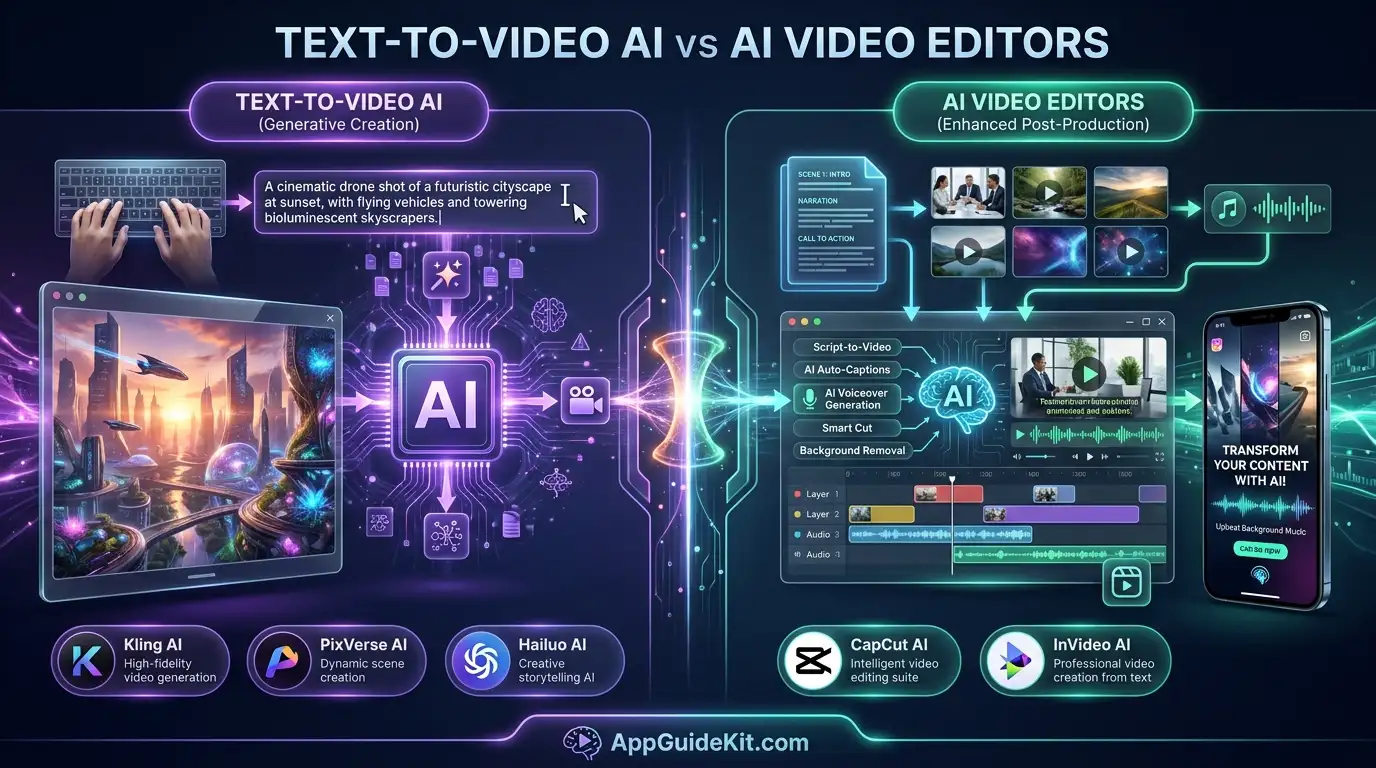
📝 Note: If you want completely original AI scenes, choose text-to-video tools. If you want faster daily content production, AI editors are usually easier.
1. Kling AI: Best Overall for Realistic Motion
Kling AI is considered one of the strongest options for creators looking for the best free ai video generator for reels without watermark because it produces realistic motion and cinematic AI scenes.
For creators making storytelling Reels, AI movie clips, product animations, or faceless videos, Kling AI offers impressive results.
Key Features and Free Credit Details
Kling AI provides:
- Text-to-video generation
- Image-to-video animation
- Realistic human movement
- Camera motion controls
- Vertical video creation
- High-detail AI scenes
You can create videos by entering a simple prompt or uploading an image that you want to animate.
Example:
“A small robot walking through a rainy cyberpunk street, cinematic lighting, slow camera movement, vertical video.”
The AI converts that idea into a short video clip.
Watermark Status and Export Quality
Kling AI’s free access usually works through a credit system. Available credits and export conditions may change depending on the account type and platform updates.
Before publishing commercial content:
- Check export settings
- Review usage rights
- Confirm watermark conditions
Pros
✅ Excellent realistic motion
✅ Strong image-to-video results
✅ Good for cinematic Reels
✅ Supports creative prompts
Cons
❌ Generation can take time
❌ Free credits are limited
❌ Advanced features may require paid access
Best for:
Creators who want realistic AI scenes and cinematic short videos.
2. PixVerse AI: Best Free Text-to-Video Creator for Reels
If you’re searching for a simple free AI reel generator that turns ideas into short social media clips quickly, PixVerse AI is one of the easiest platforms to try.
Unlike traditional video editors where you need footage first, PixVerse creates videos directly from your text prompts or images. This makes it useful for creators who run faceless TikTok channels, motivational pages, product pages, and storytelling accounts.
The biggest advantage of PixVerse is its focus on short-form content. The tool is designed around quick AI-generated clips that fit platforms like Instagram Reels, TikTok, and YouTube Shorts. For beginners looking for the best free ai video generator, PixVerse provides an easy way to experiment with AI-generated short videos.
Key Features, Credits, and Watermark Status
PixVerse AI offers several features for short video creation:
- Text-to-video generation
- Image-to-video animation
- Multiple AI video styles
- Camera movement effects
- Character animation
- Vertical 9:16 video support
- AI effects and templates
Creating a video is simple:
- Enter your idea as a text prompt.
- Select your preferred style.
- Choose the vertical format.
- Generate your AI video.
- Export and edit if needed.
For example:
“A cute golden retriever running through a magical forest, cinematic lighting, smooth camera movement, vertical 9:16 Reel style.”
PixVerse can transform this idea into a short animated scene.
Watermark and Free Export
PixVerse provides free credits for users, but the exact amount can change based on current plans and updates.
Before publishing videos for business or monetization:
- Check export settings
- Review commercial usage rules
- Confirm if free exports contain branding
Pros
✅ Beginner-friendly interface
✅ Good for TikTok-style videos
✅ Supports image animation
✅ Fast creative experiments
Cons
❌ Free generations are limited
❌ Complex scenes may need better prompts
❌ Some advanced features require paid plans
Best for:
Beginners who want a fast best free text to video AI generator for TikTok.
3. CapCut AI: Best All-in-One Editor for Faceless Reels
CapCut AI takes a different approach compared to pure AI video generators. Instead of creating every scene from zero, it combines AI tools with a complete video editing system.
Unlike traditional AI generators, CapCut shows that the best free ai video generator can also include editing features, captions, templates, and voice tools.
You might be wondering: why use an AI editor when text-to-video tools exist?
Here’s the thing: many successful short-form creators don’t need completely generated movies. They need fast production.
CapCut helps you turn:
- Scripts into videos
- Photos into animations
- Voice recordings into captions
- Raw clips into social-ready content
Key Features and Free Auto-Captions
CapCut AI includes:
AI Captions
Automatic subtitles are one of its strongest features.
This helps because many viewers watch videos without sound.
AI Voice Features
You can create:
- AI narration
- Text-to-speech voiceovers
- Voice effects
Templates and Effects
CapCut offers ready-made templates for:
- Trending TikTok styles
- Product videos
- Motivational clips
- Story videos
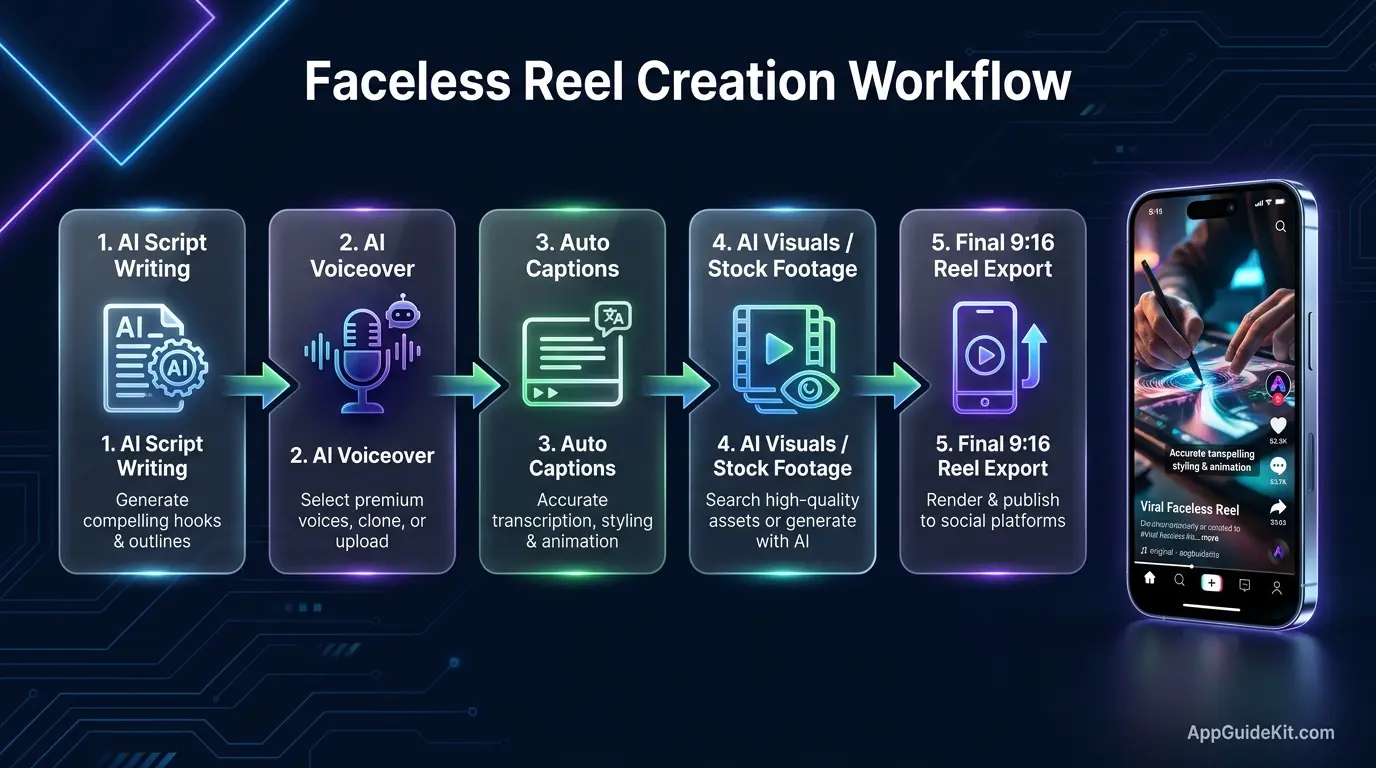
Faceless Content Workflow
A simple faceless Reel workflow:
- Write a short script using AI.
- Generate voiceover.
- Add stock footage or AI images.
- Apply captions.
- Export in 9:16 format.
This workflow is popular among:
- Quote pages
- Educational channels
- News-style creators
- Affiliate marketers
Watermark Status
CapCut exports many videos without watermarks when using normal editing features.
However, some templates, effects, or premium assets may add restrictions.
Always check before exporting.
Pros
✅ Complete editing solution
✅ Excellent captions
✅ Great for beginners
✅ Mobile-friendly
✅ Perfect for faceless Reels
Cons
❌ Not the best choice for fully AI-generated scenes
❌ Some features are locked behind paid plans
❌ Template restrictions may apply
Best for:
For creators who need editing, captions, and fast production, CapCut works differently from traditional generators and can become part of a complete best free ai video generator for reels without watermark workflow.
4. Hailuo AI (MiniMax): Best for Cinematic Short Clips
Hailuo AI, developed by MiniMax, is another text-to-video platform focused on creating cinematic AI scenes.
It stands out because it can create dramatic camera movements and visually interesting clips from simple prompts.
For creators who want movie-style TikTok videos, fantasy scenes, travel concepts, or storytelling content, Hailuo AI is worth testing.
Key Features and Motion Controls
Hailuo AI offers:
- Text-to-video creation
- Image animation
- Cinematic movement
- Realistic environments
- Short AI-generated clips
- Vertical video support
A good prompt makes a big difference.
Instead of writing:
“A person walking.”
Try:
“A traveler walking through snowy mountains at sunrise, cinematic camera tracking shot, realistic lighting, vertical 9:16 video.”
More details usually produce better results.
Watermark Status and Free Credits
Hailuo AI provides free access through limited credits. Availability, generation limits, and export rules can change over time.
For creators using AI videos commercially, review:
- Free plan restrictions
- Ownership terms
- Export conditions
Pros
✅ Cinematic visual style
✅ Strong creative effects
✅ Good for storytelling videos
✅ Simple prompt system
Cons
❌ Limited free generations
❌ Results depend heavily on prompts
❌ Some scenes may need multiple attempts
Best for:
Creators making cinematic TikTok clips and AI storytelling videos.
5. InVideo AI: Best Free Script-to-Video Generator for TikTok
InVideo AI is designed for creators who want complete videos from written ideas.
Instead of generating only short AI scenes, it can transform a script into a finished video with:
- Stock footage
- Voiceover
- Captions
- Music
- Scene suggestions
This makes it useful for marketers and creators who publish content regularly.
Key Features and Voiceover Quality
Main features include:
- AI script generation
- Text-to-video creation
- AI voiceovers
- Automatic scene selection
- Caption generation
- Social media formats
A simple workflow:
- Enter your video topic.
- Let AI create a script.
- Select voice style.
- Review scenes.
- Export your Reel.
For example:
Topic:
“5 AI tools every student should know.”
InVideo can create a complete educational short video from this idea.
Free Plan and Watermark Details
The free version allows users to test the platform, but limitations may include:
- Export restrictions
- Branding on free videos
- Limited AI generations
If you plan to monetize content, always check current licensing terms.
Pros
✅ Excellent for script-based videos
✅ Good AI voice options
✅ Saves editing time
✅ Great for marketers
Cons
❌ Less control over individual AI scenes
❌ Free exports may have limitations
❌ Stock footage style may feel less unique
Best for:
Creators who want a free AI voiceover and video generator for Reels.
6. Luma Dream Machine: Best Free Image-to-Video Generator for Reels
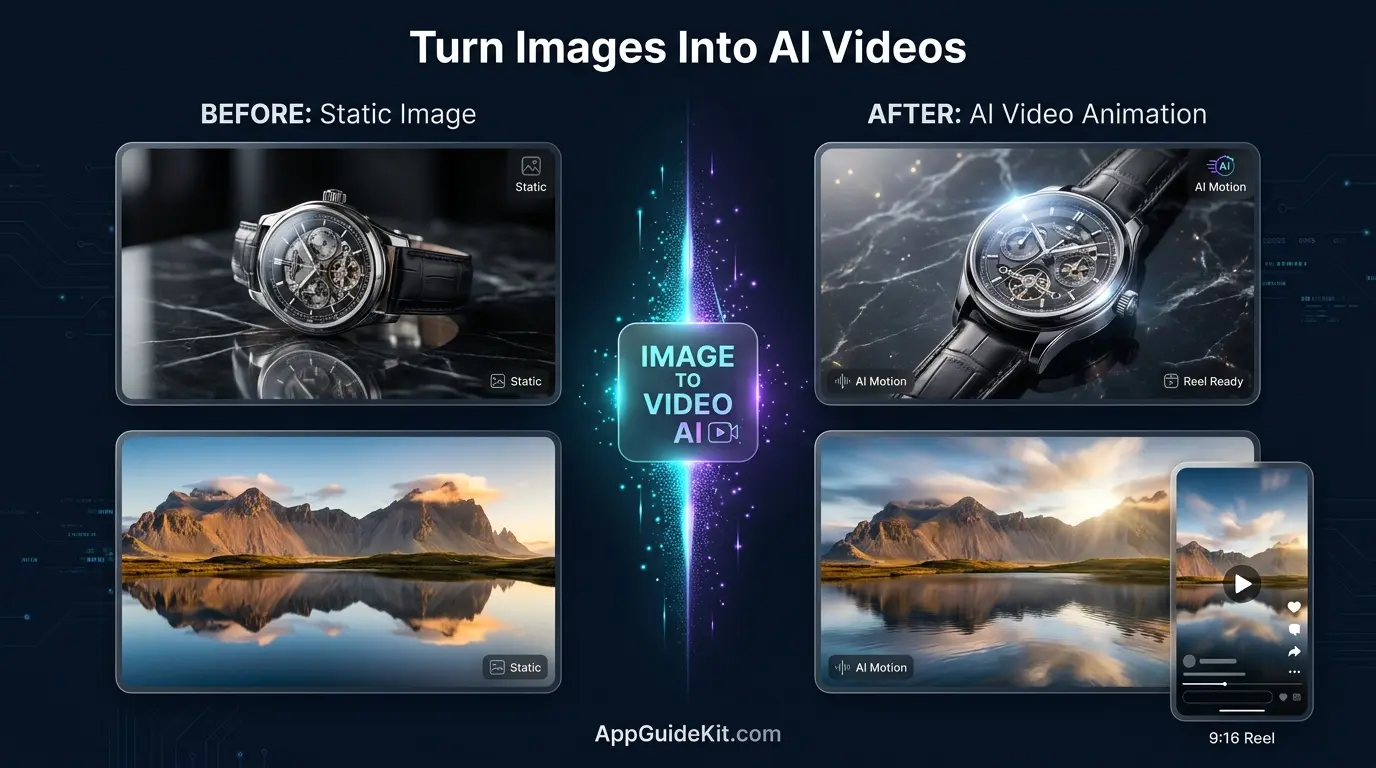
Luma Dream Machine is a powerful choice for creators who want to transform static images into engaging short videos. Instead of creating everything from a text prompt, this tool focuses heavily on image-to-video animation, making it useful for photographers, designers, product creators, and storytelling channels.
If you already have AI-generated images, product photos, artwork, or thumbnails, Luma can add movement and turn them into dynamic Reels.
For example, a simple image of a luxury car can become:
- A moving camera shot
- A cinematic driving scene
- A product showcase video
This approach is becoming popular because creators can design the exact image first and then animate it.
Key Features, Camera Controls, and Export Options
Luma Dream Machine includes features such as:
- Image-to-video generation
- Text-to-video creation
- Natural camera movement
- Cinematic animations
- Realistic motion effects
- Creative scene generation
The quality of your input image matters a lot.
A detailed image with a clear subject usually creates better results.
Example prompt:
“Animate this image with a slow cinematic camera movement, realistic lighting, gentle wind effects, and professional commercial video style, vertical 9:16 format.”
The AI understands movement instructions and adds animation around the original image.
Free Credits and Watermark Status
Luma Dream Machine offers limited free generations. The available credits, video length, and export conditions may change depending on the current plan.
Before using AI videos for business purposes, check:
- Free plan limitations
- Commercial rights
- Export restrictions
Pros
✅ Excellent image animation quality
✅ Good cinematic camera effects
✅ Useful for product videos
✅ Great for creative storytelling
Cons
❌ Free credits are limited
❌ Complex scenes may need retries
❌ Not ideal for fast bulk content creation
Best for:
Creators looking for a best free image to video AI generator for Reels.
7. Runway Gen-3: Best Pro Control for Creative Reels
Runway Gen-3 is designed for creators who want more control over AI-generated videos.
While beginner tools focus on quick results, Runway provides advanced creative options closer to professional filmmaking workflows.
It is commonly used for:
- AI commercials
- Creative experiments
- Short films
- Social media campaigns
- Brand content
For creators who want to experiment with advanced AI visuals, Runway offers a deeper toolkit.
Key Features and Free Credit Limits
Runway Gen-3 includes:
- Text-to-video generation
- Image-to-video animation
- Advanced motion controls
- Camera direction prompts
- Professional editing tools
- Creative effects
A detailed prompt can produce more controlled results.
Example:
“A luxury watch floating above water, slow-motion cinematic camera movement, realistic reflections, premium advertisement style, vertical 9:16 video.”
The more specific your description, the better the output.
Watermark Status and Export Rules
Runway provides limited free credits for new users. Free usage is mainly designed for testing and learning.
Creators should check:
- Current free credits
- Export limitations
- Commercial licensing requirements
Pros
✅ Professional creative controls
✅ High-quality AI video output
✅ Great for advanced creators
✅ Strong editing ecosystem
Cons
❌ Limited free usage
❌ More expensive for regular production
❌ Requires learning time
Best for:
Creators who want professional-level AI Reel production.
Text-to-Video vs Image-to-Video: Which Works Better?
Choosing between text-to-video and image-to-video depends on your content goals.
Both methods are useful, but they solve different problems.
| Feature | Text-to-Video | Image-to-Video |
| Starting Point | Written prompt | Existing image |
| Best For | New creative scenes | Animating designs/photos |
| Control Level | Medium | Higher visual control |
| Learning Difficulty | Easy | Easy to Medium |
| Popular Tools | Kling, PixVerse, Hailuo | Luma, Kling, Runway |
When Should You Use Text-to-Video?
Text-to-video works best when you need completely new visuals.
Examples:
- Fantasy stories
- AI characters
- Movie-style scenes
- Educational animations
- Concept videos
You simply describe your idea and let AI create the scene.
When Should You Use Image-to-Video?
Image-to-video is better when you already have a visual concept.
Examples:
- Product advertisements
- Photo animations
- Digital artwork
- Before-and-after videos
- Brand content
💡 Pro Tip: Many successful creators combine both methods. They create images first, animate them with AI, then edit everything inside CapCut.
Cloud AI Credits vs Open-Source Video Generators
Many creators wonder whether they should use free cloud AI tools or install open-source AI video models.
The answer depends on your technical skills and available hardware.
Are Open-Source AI Video Tools Really Free?
Open-source AI models are often free to download, but they are not always free to use.
You may need:
- A powerful GPU
- Technical knowledge
- Storage space
- Time for setup
Cloud platforms are usually easier because everything runs online.
Free Credit Platforms
Examples:
- Kling AI
- PixVerse AI
- Hailuo AI
- Luma Dream Machine
Advantages:
✅ No installation required
✅ Beginner-friendly
✅ Faster setup
Disadvantages:
❌ Credit limits
❌ Account restrictions
❌ Online dependency
Open-Source AI Generators
Advantages:
✅ More control
✅ No daily credit limits
✅ Custom workflows possible
Disadvantages:
❌ Difficult setup
❌ Requires powerful hardware
❌ Not beginner-friendly
For most Reel creators, free credit platforms are the practical starting point.
How to Generate Viral 9:16 Reels With AI Prompts
A great AI video starts with a great prompt.
Many beginners write short prompts like:
“Make a cat video.”
The result is usually average.
A better prompt includes:
- Subject
- Action
- Environment
- Camera movement
- Lighting
- Style
- Aspect ratio
5 Ready-to-Use 9:16 Vertical Video Prompts
1. Cinematic Travel Reel
Prompt:
“A traveler walking through ancient European streets during golden hour, cinematic camera tracking shot, realistic details, warm sunlight, professional travel documentary style, vertical 9:16 video.”
2. AI Product Advertisement
Prompt:
“A premium smartphone rotating on a glass surface, dramatic studio lighting, slow motion camera movement, luxury advertisement style, ultra realistic, vertical 9:16 format.”
3. Faceless Motivation Video
Prompt:
“A person walking alone on a mountain road at sunrise, inspirational mood, cinematic atmosphere, slow camera movement, emotional storytelling style, vertical Reel format.”
4. Fantasy Story Clip
Prompt:
“A magical forest with glowing plants and a mysterious character walking through mist, fantasy movie style, cinematic lighting, smooth camera movement, 9:16 vertical video.”
5. Educational AI Reel
Prompt:
“Animated futuristic classroom showing artificial intelligence concepts, clean modern design, engaging educational style, smooth transitions, vertical short video format.”
🔥 Quick Tip: Always mention “vertical 9:16” inside your prompt. It helps AI understand that your video is designed for Reels and TikTok instead of traditional landscape videos.
Free vs Paid AI Video Generators: When Should You Upgrade?
Free AI video generators are enough for many beginners, but they come with limits. If you’re testing ideas, learning AI video creation, or posting occasionally, free plans can work well.
However, creators who publish daily content often reach free limits quickly.
The right time to upgrade depends on your workflow.
Stay With Free AI Tools If You:
Free plans are usually enough when you:
- Create a few videos per week
- Test different content ideas
- Run a small social media page
- Don’t need advanced effects
- Are still learning AI prompts
For example, a beginner creating two or three motivational Reels weekly can easily start with free credits.
Consider Paid Plans If You:
A paid plan makes sense when you need:
- More daily generations
- Longer videos
- Faster processing
- Higher resolution exports
- Commercial licenses
- Advanced AI models
Professional creators, agencies, and businesses usually upgrade because time becomes more valuable than saving a few dollars.
💡 Pro Tip: Don’t subscribe immediately. First test a free version, understand your content style, and upgrade only when the tool becomes part of your regular workflow.
Commercial Use Rights for Free AI Videos
Many creators ask:
“Can I monetize AI-generated Instagram Reels on Facebook or YouTube?”
The answer depends on the AI tool’s current terms and the type of content you create.
A free AI video generator may allow personal use but have different rules for commercial projects.
Before publishing monetized content, check:
- Commercial usage rights
- Attribution requirements
- Ownership rules
- Stock media licenses
- AI-generated content policies
Things To Check Before Monetizing
1. Free Plan Restrictions
Some platforms limit commercial use on free accounts.
Always read:
- License agreements
- Export terms
- Creator guidelines
2. Add Your Own Value
Platforms generally prefer content that provides human creativity.
Instead of uploading a simple AI-generated clip, improve it with:
- Your own script
- Voiceover
- Editing
- Commentary
- Educational information
3. Avoid Copyright Problems
Don’t create videos using:
- Protected characters
- Famous personalities without permission
- Copyrighted music
- Brand assets you don’t own
📝 Note: AI tools are constantly changing their policies. Always check official terms before using free AI videos for business purposes.
Frequently Asked Questions
What is the best free AI video generator for reels without watermark?
The best free ai video generator for reels without watermark depends on your needs. Kling AI, PixVerse, and CapCut are popular choices because they cover AI generation, editing, captions, and vertical video creation.
No tool guarantees unlimited free usage forever, so always check current export conditions before creating large amounts of content.
Can I generate Instagram Reels with AI for free?
Yes, you can create Instagram Reels with AI for free using tools like Kling AI, PixVerse, CapCut AI, Hailuo AI, and other platforms that provide free credits or free editing features.
A simple workflow is:
- Create a script.
- Generate visuals.
- Add AI voiceover.
- Add captions.
- Export in 9:16 format.
How do I make AI TikTok videos without a watermark?
To make AI TikTok videos without a watermark:
- Choose tools that allow clean exports
- Avoid restricted templates
- Check export settings before downloading
- Use free features instead of premium assets when required
Some platforms change their watermark rules frequently, so always verify before publishing.
Can I monetize AI-generated Instagram Reels on Facebook or YouTube?
Yes, AI-generated videos may be monetized if they follow platform rules and provide original value.
Adding your own:
- Narration
- Editing
- Educational content
- Storytelling
can make your videos more unique.
Always review the latest monetization policies of the platform you use.
Which free AI video tool is best for faceless TikTok channels?
CapCut AI is one of the easiest choices for faceless TikTok channels because it combines captions, voiceovers, templates, and editing tools.
For fully AI-generated scenes, Kling AI, PixVerse, and Hailuo AI are useful alternatives.
What are the daily credit limits on free AI video generators?
Daily credits vary by platform and can change over time.
Most free AI video tools use:
- Daily tokens
- Monthly credits
- Limited generations
Always check your account dashboard because free limits may change.
Can I turn images into video Reels using AI for free?
Yes. Several tools support free image-to-video creation.
Popular options include:
- Luma Dream Machine
- Kling AI
- PixVerse
- Runway
You can upload an image and add movement instructions to create a short Reel.
Are open-source AI video generators really free?
Open-source AI models are usually free to download, but running them may require expensive hardware and technical knowledge.
Cloud-based free AI tools are often easier for beginners because they don’t require installation.
Is Google Veo inside Gemini free for video generation?
Google’s AI video features and availability depend on current Google plans, regions, and product access. Free availability can change, so users should check Google’s official information for the latest access details.
How do I export 9:16 vertical video without losing quality?
For the best quality:
- Select 9:16 before generating the video.
- Export at the highest available resolution.
- Avoid repeated resizing.
- Use platform-recommended formats.
- Keep important subjects away from edges.
Final Verdict: Which Free AI Generator Should You Pick?
Choosing the best free ai video generator depends on what you want to create.
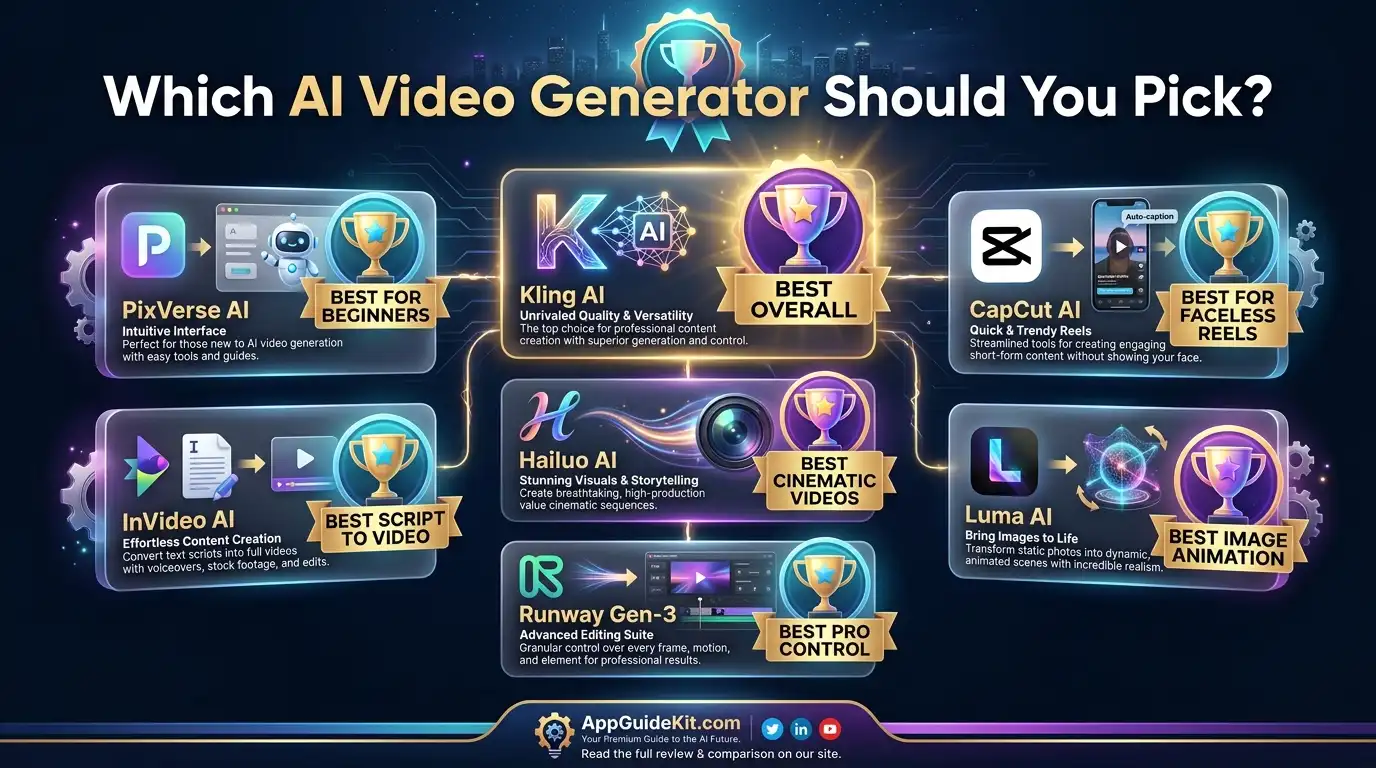
If you need realistic AI scenes, Kling AI and PixVerse are excellent starting points. If your goal is creating daily faceless Reels quickly, CapCut AI offers a complete workflow with editing, captions, and voice features.
For image animation, Luma Dream Machine is a strong option, while advanced creators may prefer Runway Gen-3 for more creative control.
The truth is, there isn’t one perfect tool for everyone. The best free ai video generator for reels without watermark is the one that matches your content style, publishing frequency, and editing needs.
Start with free tools, test different prompts, and build a workflow that helps you create better short-form videos faster.
Now it’s your turn: choose a tool, create your first 9:16 AI Reel, and start experimenting.