

Introduction
Finding low competition keywords for free is one of the best SEO strategies for beginner bloggers, small website owners, and content creators who want to increase organic traffic without paying for expensive SEO software.
Many new websites fail to get traffic because they target keywords that are already dominated by large websites, established brands, and high-authority domains.
A smarter approach is to find specific keywords that have lower competition, clear search intent, and a realistic chance of ranking.
The good news is that you do not need expensive SEO tools to start keyword research. Free resources like Google Keyword Planner, Google Search Console, Google Autocomplete, and other free SEO tools can help you discover valuable opportunities.
In this guide, you will learn how to find low competition keywords for free, analyze keyword difficulty, discover competitor opportunities, and create a practical keyword strategy for your website.
This approach follows a people-first content strategy by focusing on useful information, practical solutions, and helping users achieve their goals.
What Are Low Competition Keywords?
Low competition keywords are search terms that have fewer strong websites competing for them. These keywords are usually more specific and target a clear user need.
Instead of fighting for broad keywords with thousands of competitors, beginners can focus on smaller topics where they can provide better and more helpful content.

Example:
High Competition Keyword:
AI tools
This keyword is very broad.
People searching this term may want:
- AI writing tools
- AI image generators
- AI automation tools
- AI productivity software
Large technology websites and software companies usually compete for this type of keyword.
Low Competition Keyword:
Best free AI tools for students
This keyword is more specific.
It targets:
- Students
- People looking for free solutions
- Users with a clear goal
A smaller website has a better chance to create a useful article around this topic.
Low Competition Keywords vs High Competition Keywords
| Keyword Type | Example | Competition Level |
| Broad Keyword | AI tools | Very High |
| Medium Keyword | Best AI writing tools | Medium |
| Long-Tail Keyword | Best free AI writing tools for students | Lower |
Why Beginners Should Target Low Competition Keywords
If you have a new website, competing for popular keywords can be difficult.
Large websites often have:
- Strong domain authority
- Thousands of backlinks
- Years of published content
- Brand recognition
Instead of competing directly with them, beginners should look for realistic keyword opportunities.
1. Low Competition Keywords Are Easier to Target
Specific keywords usually have fewer competitors.
For example:
Instead of targeting:
Best laptops
A beginner technology website can target:
Best laptops for online students under $500
The second keyword has:
- A clearer audience
- A specific problem
- Better content direction
2. They Bring More Relevant Visitors
More traffic does not always mean better results.
A visitor searching:
free password manager for Android without subscription
already has a specific need.
This person is more likely to:
- Read your article
- Explore your recommendations
- Visit related pages
3. They Help Build Website Authority
Low competition keywords help you build topic authority over time.
For example:
Main Topic:
AI Tools
Related Articles:
- Best Free AI Tools for Students
- AI Writing Tools for Bloggers
- AI Image Generators
- AI Productivity Apps
- AI Tools for Small Businesses
This creates a content cluster around one topic.
Understanding Keyword Difficulty (KD)
Keyword difficulty (KD) is a metric used by SEO tools to estimate how difficult it may be to rank for a keyword.
Many SEO platforms provide KD scores, but you should not depend only on this number.
A keyword with a low KD score can still be difficult if:
- Strong websites dominate Google results
- Search intent is unclear
- Existing articles are very detailed
- Your website does not provide enough value
SEO tools are useful, but manual analysis is still important.
How to Check Keyword Competition Manually
Before choosing a keyword, search it on Google and study the first page.
Ask these questions:
Who is Ranking?
Check whether results are from:
✅ Small blogs
✅ Niche websites
✅ Forums
✅ Newer websites
Or:
❌ Major brands
❌ Government websites
❌ Large publishers
Signs of a Good Keyword Opportunity
A keyword may be easier when you find:
✅ Outdated articles
✅ Short content
✅ Missing explanations
✅ Poor examples
✅ Weak user experience
Example:
Search:
Best free AI tools for bloggers
If ranking articles only provide a short list but do not explain:
- How each tool works
- Pricing limitations
- Privacy concerns
- Real use cases
you can create a better resource.
Why Search Volume Is Not the Only Factor
Many beginners choose keywords only because they have high search volume.
This can be a mistake.
A keyword with:
- 50,000 searches
- High competition
may be harder than a keyword with:
- 500 searches
- Low competition
Example:
Difficult Keyword:
SEO tools
Better Keyword:
Free SEO tools for beginner bloggers
The second keyword has:
- Clear audience
- Specific problem
- Better search intent
How to Find Low Competition Keywords for Free: Step-by-Step Process
You can discover valuable keyword opportunities without expensive subscriptions.
The process is simple:
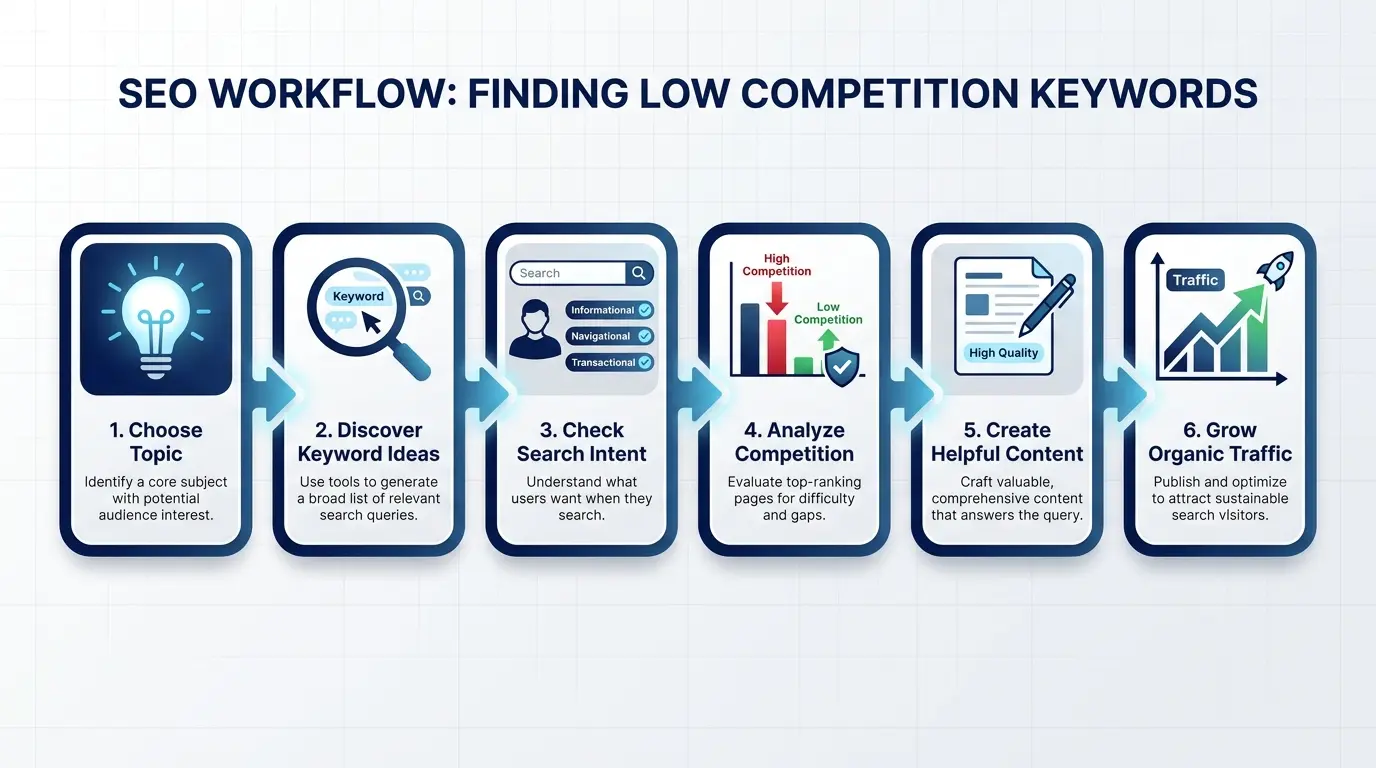
- Choose a topic
- Find keyword ideas
- Check competition
- Analyze search intent
- Create better content
Step 1: Choose a Seed Keyword
A seed keyword is your starting topic.
It is usually a broad phrase related to your website niche.
For a technology website like AppGuideKit.com, examples include:
- AI tools
- Android apps
- Productivity software
- Security apps
- Blogging tools
- Video editing software
Your seed keyword helps you discover more specific keyword ideas.
Technology Example:
Seed Keyword:
AI tools
Possible keyword ideas:
- Free AI tools for students
- AI tools for content writers
- AI productivity apps
- AI tools for small businesses
Expert Tip: Start With Ideas, Not Perfect Keywords
Many beginners waste time searching for the “perfect keyword.”
A better approach:
First collect 30–50 keyword ideas.
Then filter them using:
- Competition
- Search intent
- Audience relevance
- Content opportunity
Step 2: Use Google Autocomplete to Find Keyword Ideas
Google Autocomplete is one of the easiest free keyword research methods.
When you type something into Google, it suggests searches based on what users commonly search.
These suggestions can help you discover long-tail keywords.
How to Use Google Autocomplete
Step 1:
Open Google Search.
Step 2:
Enter your seed keyword.
Example:
AI tools
Step 3:
Review the suggestions.
You may find:
- AI tools for students
- AI tools for writing
- AI tools for productivity
- AI tools for business
Step 4:
Save useful keywords in a spreadsheet.
Why Google Autocomplete Is Useful
It helps you discover:
- Real search ideas
- User questions
- Long-tail variations
- Content topics
Common Mistake:
Do not create an article for every keyword suggestion.
Before writing, check:
- Does this keyword match my audience?
- Can I provide better information?
- Are competitors weak?
Step 3: Use Google Keyword Planner for Free Keyword Research
Google Keyword Planner is one of the most useful free keyword research tools for beginners. It helps you discover keyword ideas, related search terms, and search estimates that can guide your content strategy.
Although Google created it mainly for advertisers, bloggers and website owners can also use it to find content opportunities.
For a technology website like AppGuideKit.com, Keyword Planner can help you discover topics related to:
- AI tools
- Mobile apps
- Software
- Productivity solutions
- Digital guides
How to Use Google Keyword Planner Step by Step
Step 1: Open Keyword Planner
Access Google Keyword Planner through Google Ads.
Choose:
Discover new keywords
This option helps you find keyword ideas related to your topic.
Step 2: Enter Your Seed Keyword
Example:
AI tools
Google will generate related keyword ideas.
Possible suggestions:
- Free AI tools
- AI tools for students
- AI tools for content creation
- AI productivity tools
- Best AI apps
Step 3: Filter Your Keyword Ideas
When reviewing keywords, focus on:
- Relevance
- Search intent
- Competition level
- Potential content value
Google Keyword Planner allows users to refine keyword ideas using filters such as keyword text, search estimates, and competition-related information.
Example: Finding Better Keywords
Starting keyword:
AI tools
Possible results:
| Keyword | Opportunity |
| AI tools | Very broad |
| Best AI writing tools | Competitive |
| Free AI writing tools for bloggers | More specific |
| AI writing tools for beginner bloggers | More targeted |
The last keyword may attract fewer searches, but it has a clearer audience.
Google Keyword Planner Pros and Cons
Pros:
✅ Free keyword discovery
✅ Uses Google data
✅ Good for beginners
✅ Helps generate topic ideas
Cons:
❌ Not designed specifically for SEO difficulty analysis
❌ Some data may be broad
❌ Advanced competitor insights require other tools
Expert Advice:
Do not choose keywords only because they have high search volume.
A better keyword is one that:
- Matches your audience
- Solves a problem
- Has realistic competition
- Fits your website expertise
Step 4: Use Google Search Console to Find Hidden Keyword Opportunities
If you already have a website, Google Search Console is one of the most valuable free SEO tools available.
Instead of searching for new keywords only, Search Console shows you keywords where your website is already appearing in Google results.
This creates opportunities to improve existing content.
Why Google Search Console Is Powerful
Many website owners miss keywords they are already ranking for.
Example:
You publish an article:
Best AI Writing Tools
After a few weeks, Google Search Console may show impressions for:
- AI writing tools for students
- Free AI writing apps
- AI tools for bloggers
These keywords can help you improve your article.
How to Find Keyword Opportunities in Search Console
Step 1:
Open Google Search Console.
Step 2:
Go to:
Performance → Search Results
Step 3:
Review:
- Queries
- Impressions
- Clicks
- Average position
Focus on Keywords Ranking Between Positions 8–20
These keywords are valuable because your content is already close to page one.
Small improvements can help:
- Add missing information
- Improve headings
- Add examples
- Answer related questions
Example:
Current ranking:
Position 15:
Best free AI tools for students
Improvement ideas:
Add sections about:
- Tool features
- Pricing
- Privacy
- Student use cases
- Alternatives
This can make your content more complete.
Step 5: Use Ubersuggest Free Plan for Keyword Research
Ubersuggest is a beginner-friendly SEO tool that helps users find keyword ideas and understand basic competition levels.
It can be useful for bloggers who want a simple alternative to advanced SEO platforms.
Main Features of Ubersuggest
Ubersuggest provides:
- Keyword suggestions
- Search volume estimates
- SEO difficulty information
- Content ideas
- Competitor analysis
How to Use Ubersuggest
Step 1:
Enter your topic.
Example:
free SEO tools
Step 2:
Review keyword suggestions.
Look for:
- Long-tail keywords
- Question keywords
- Lower competition ideas
Step 3:
Compare keyword opportunities.
Example:
Main keyword:
SEO tools
Better opportunities:
- Free SEO tools for bloggers
- SEO tools for small websites
- SEO tools without monthly subscription
Ubersuggest Pros and Cons
Pros:
✅ Easy interface
✅ Beginner friendly
✅ Helpful keyword suggestions
✅ Useful content ideas
Cons:
❌ Free usage has limits
❌ Advanced features require paid plans
Step 6: Use AnswerThePublic to Discover Search Questions
AnswerThePublic helps you find questions people search around a topic.
It is especially useful for creating:
- Tutorial articles
- FAQ sections
- Problem-solving content
Example:
Topic:
ChatGPT
Possible questions:
- How to use ChatGPT for writing?
- Is ChatGPT free?
- How does ChatGPT work?
- Can ChatGPT help students?
These questions can become:
- Blog sections
- New articles
- FAQ content
Why Question Keywords Are Valuable
Question keywords often have:
✅ Clear user intent
✅ Specific problems
✅ Better content opportunities
For example:
Broad:
Specific:
Why Instagram reach dropped suddenly
The second keyword clearly explains the user’s problem.
How to Find Long-Tail Keywords Without Paid Tools
Long-tail keywords are longer and more specific search phrases.
They are often valuable for beginners because they target users with a clear purpose.
Example:
Broad Keyword:
Password manager
Problem:
Too general.
Long-Tail Keyword:
Best free password manager for Android beginners
Better because:
- Audience is clear
- Search intent is specific
- Content direction is easier
Free Methods to Discover Long-Tail Keywords
1. Google Autocomplete
Find suggestions from real searches.
Example:
Search:
AI apps
Suggestions:
- AI apps for students
- AI apps for productivity
- AI apps for Android
2. People Also Ask
Google’s People Also Ask section provides related questions.
Use these questions to:
- Improve articles
- Create FAQ sections
- Find new content ideas
3. Related Searches
At the bottom of Google results, related searches can reveal more keyword variations.
4. Community Research
Look at:
- Reddit discussions
- Forums
- Question websites
Users often describe their real problems in their own words.
These phrases can become valuable keywords.
Best Free Semrush Alternatives for Beginners
Many beginners search for free Semrush alternatives because premium SEO tools can be expensive.
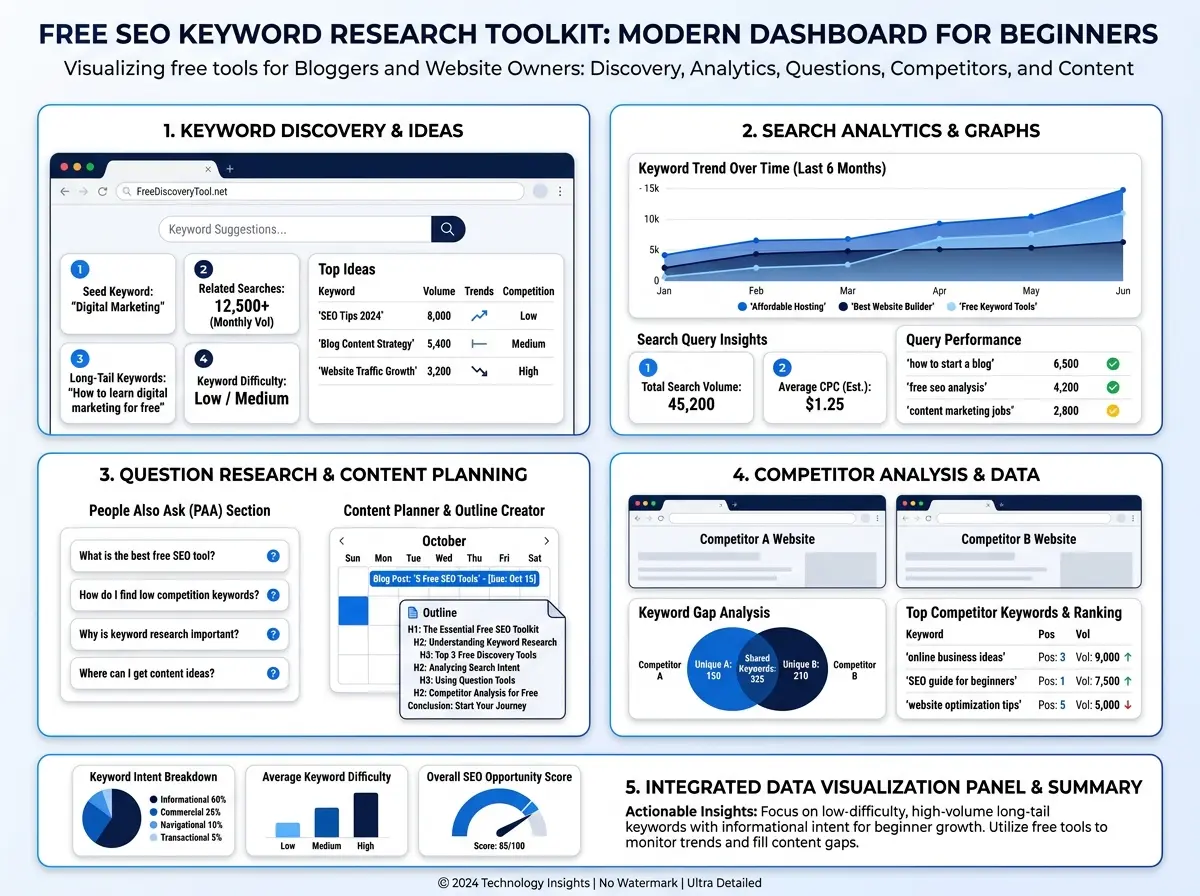
A practical free keyword research stack:
| Tool | Best Use |
| Google Keyword Planner | Keyword ideas and search data |
| Google Search Console | Existing ranking opportunities |
| Ubersuggest | Beginner keyword analysis |
| AnswerThePublic | Question discovery |
| Google Autocomplete | Long-tail ideas |
How to Find Competitor Keywords Without Paid Tools
Competitor research helps you understand what topics already perform well.
You do not need expensive SEO software to start.
Step 1: Find Competitor Articles
Search your target keyword on Google.
Example:
best free AI tools
Open the top-ranking pages.
Step 2: Study Their Content
Analyze:
- Article headings
- Topics covered
- Questions answered
- Missing information
Do not copy their content.
Your goal is to understand:
“What value can I add that competitors missed?”
Step 3: Find Content Gaps
A content gap is information missing from existing articles.
Example:
Competitor article:
Best AI Tools
Missing:
- AI tools for students
- Free AI tools without signup
- AI tools for bloggers
- Privacy concerns
- Real examples
A stronger article can cover these missing areas.
How to Find Low KD Keywords Without Paid Tools
Finding low KD keywords does not always require expensive SEO subscriptions. You can discover many opportunities by combining free tools with manual Google search analysis.
Keyword difficulty scores are useful, but they are only estimates. A keyword with a low difficulty score can still be competitive if strong websites dominate the results. Always combine tool data with search intent and SERP analysis. Creating original, useful content that satisfies users is a key part of Google’s people-first content guidance.
Step 1: Search the Keyword on Google
Start by entering your keyword into Google.
Example:
Keyword:
free AI tools for students
Now analyze the first-page results.
Look at:
- Who is ranking?
- What type of websites appear?
- How detailed are their articles?
- Are users getting complete answers?
Step 2: Check the Strength of Ranking Pages
A keyword may be easier when you see:
✅ Small blogs ranking
✅ Niche websites ranking
✅ Outdated articles
✅ Short content
✅ Missing information
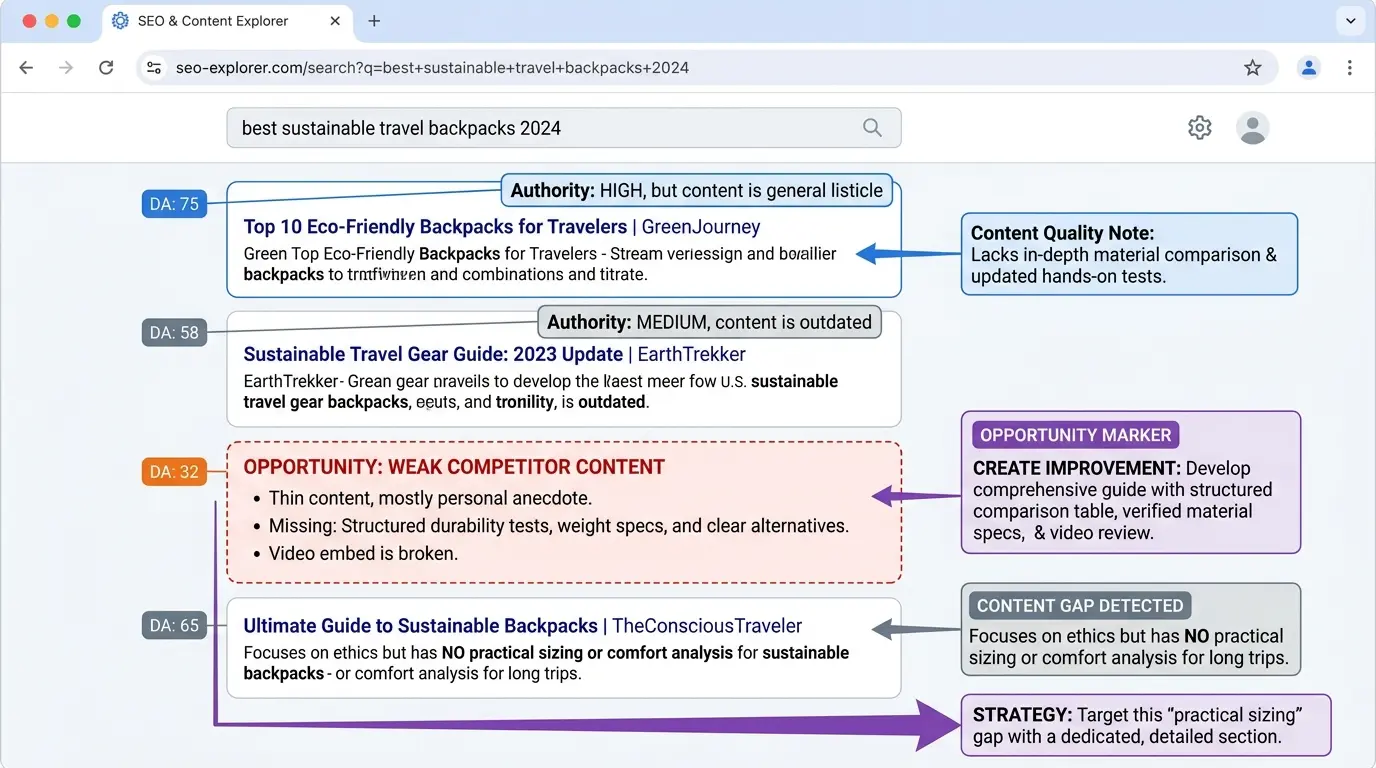
A keyword may be harder when you see:
❌ Major technology websites
❌ Big brands
❌ Very detailed guides
❌ Strong authority websites
Step 3: Look for Content Gaps
A content gap means existing articles do not fully answer the user’s question.
Example:
Current ranking article:
Best AI Tools
Missing information:
- Which tools are free?
- Which tools are best for students?
- Privacy concerns
- Real examples
- Limitations
- Alternatives
You can create a stronger article by covering these missing areas.
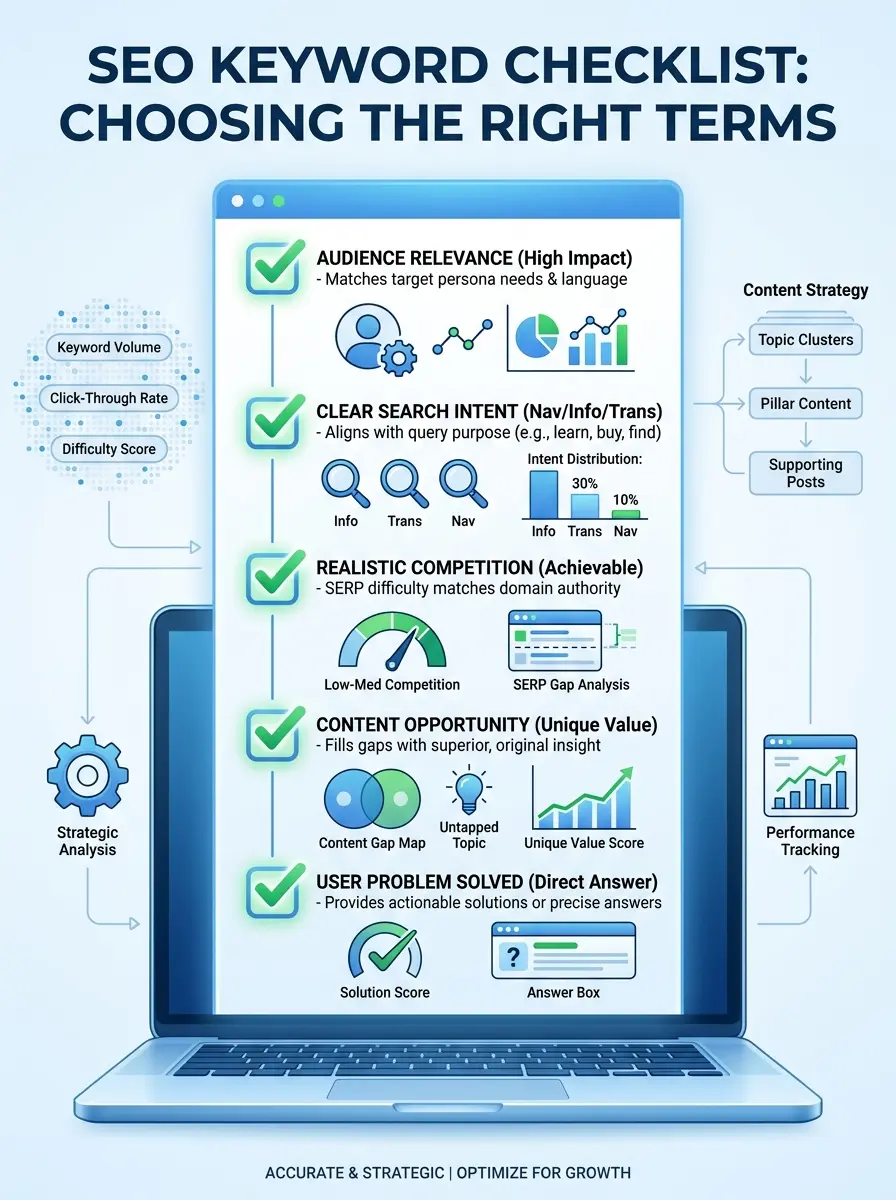
Keyword Selection Checklist Before Writing
Before creating content, check these points:
1. Is the Keyword Relevant?
Ask:
Does this keyword match my website topic?
Example:
AppGuideKit.com topics:
✅ Apps
✅ AI tools
✅ Software
✅ Tutorials
A random finance keyword would not fit.
2. Does It Solve a Clear Problem?
Good keywords usually answer a need.
Example:
Weak:
AI
Better:
How to use AI tools for content writing
The second keyword shows what the user wants.
3. Can You Create Better Content?
Ask:
Can I provide more value than current results?
You can improve by adding:
- Better examples
- Updated information
- Screenshots
- Step-by-step instructions
- Honest tool comparisons
4. Are Weak Websites Ranking?
If smaller websites rank on page one, it may be a good opportunity.
Common Keyword Research Mistakes Beginners Should Avoid
Mistake 1: Choosing Only High Search Volume Keywords
High search volume does not always mean high success.
Example:
Difficult:
AI software
Better:
Free AI software for small businesses
The second keyword targets a specific audience.
Mistake 2: Ignoring Search Intent
Search intent means understanding why someone searches a keyword.
Example:
Keyword:
VPN
Possible intentions:
- Download VPN
- Compare VPN services
- Learn what VPN means
- Fix VPN problems
A better content target:
Best free VPN apps for Android beginners
This clearly matches a user need.
Mistake 3: Trusting Keyword Difficulty Scores Completely
SEO tools provide helpful estimates, but they do not replace human analysis.
Always check:
- Google results
- Competitor quality
- Search intent
- Content gaps
Mistake 4: Targeting Too Many Keywords in One Article
A single article should have:
One main keyword:
Example:
free keyword research tools for SEO
Supporting keywords:
- find low competition keywords for free
- low KD keywords
- competitor keywords
- long-tail keywords
Avoid adding unrelated topics.
Mistake 5: Creating Content Without Understanding the Audience
Before writing, ask:
Who is searching this?
Example:
Keyword:
Free SEO tools
Possible audience:
- Beginner bloggers
- Small businesses
- Website owners
Your explanation should match their knowledge level.
Expert Tips to Find Better Keyword Opportunities
Tip 1: Focus on Problem-Solving Keywords
People search Google because they need answers.
Problem-based keywords often have strong intent.
Examples:
Instead of:
Try:
Why Instagram reach dropped and how to fix it
Instead of:
Password manager
Try:
How to recover passwords from a password manager
Tip 2: Build Content Clusters
Do not publish random articles.
Create connected content around one topic.
Example:
Main Topic:
AI Tools
Supporting Articles:
- Best Free AI Tools
- AI Writing Tools
- AI Image Generators
- AI Tools for Students
- AI Productivity Apps
This helps create a stronger website structure.
Tip 3: Update Existing Content
Sometimes your best keyword opportunities already exist.
Use Google Search Console to find:
- Keywords getting impressions
- Articles ranking on page two
- Pages losing traffic
Improve them with:
- New sections
- Better examples
- Updated information
- FAQs
Tip 4: Use Real User Questions
Great keyword ideas often come from real conversations.
Find questions from:
- Forums
- YouTube comments
- Community discussions
Users often explain their problems naturally.
Those phrases can become excellent content ideas.
Free Keyword Research Workflow for Beginners
Here is a simple repeatable process:
Step 1:
Choose your topic.
Example:
AI tools
↓
Step 2:
Find keyword ideas.
Use:
- Google Autocomplete
- Keyword Planner
- AnswerThePublic
↓
Step 3:
Filter keywords.
Remove:
- Very broad topics
- Extremely competitive terms
↓
Step 4:
Check Google results.
Analyze:
- Competitors
- Content quality
- Missing information
↓
Step 5:
Create better content.
Include:
- Clear answers
- Examples
- Screenshots
- Helpful recommendations
Best Free Keyword Research Tool Stack
You do not need one tool for everything.
A beginner-friendly combination:
| Tool | Best Use |
| Google Autocomplete | Keyword ideas |
| Google Keyword Planner | Search data |
| Google Search Console | Existing opportunities |
| Ubersuggest | Keyword suggestions |
| AnswerThePublic | Question research |
Frequently Asked Questions
What are low competition keywords?
Low competition keywords are search terms with fewer strong websites competing for them. They are usually more specific and have clearer search intent. Beginners often target these keywords because they provide more realistic opportunities compared with broad, highly competitive keywords.
How can I find low competition keywords for free?
You can find low competition keywords for free using Google Autocomplete, Google Keyword Planner, Google Search Console, Ubersuggest, and manual Google searches. The process involves collecting keyword ideas, checking competition, understanding search intent, and creating content that provides more value than existing pages.
Do I need paid SEO tools to find low KD keywords?
No, paid tools are not required when starting. Free tools can help beginners discover useful keyword ideas and analyze basic competition. Premium tools provide deeper competitor data and advanced metrics, but a strong SEO foundation can be built with free resources.
Are long-tail keywords easier to rank for?
Yes, long-tail keywords are often easier for beginners because they are more specific and usually have clearer search intent. For example, “best free AI tools for students” is easier to target than the broad keyword “AI tools” because it focuses on a specific audience.
Are free keyword research tools safe?
Yes, popular keyword research tools from trusted providers are generally safe. Always use official websites, check permissions before connecting accounts, and avoid unknown tools that request unnecessary access to your website or personal data.
Why am I not ranking after choosing a low competition keyword?
A low competition keyword does not guarantee rankings. Your content may need improvement in areas like search intent, article quality, website authority, technical SEO, and user experience. Review competing pages and make your content more complete and helpful.
Which free keyword research tool is best for beginners?
Google Keyword Planner and Google Search Console are excellent starting points because they provide reliable Google-based data. Ubersuggest and AnswerThePublic are also useful for discovering additional ideas and understanding user questions.
Conclusion: Start Finding Low Competition Keywords and Grow Your Website
Learning how to find low competition keywords for free gives beginners a practical way to discover SEO opportunities without expensive software.
The goal is not to find keywords with the biggest search volume. The goal is to find keywords that match your audience, solve real problems, and have realistic competition.
A simple process can help you:
- Choose a topic
- Find keyword ideas
- Analyze competition
- Understand search intent
- Create better content

For a technology website like AppGuideKit.com, focusing on specific topics such as AI tools, apps, software guides, and digital solutions can help build long-term authority.
Start small. Find realistic keywords, create useful content, and improve your articles over time.
Helpful content created for users first — with original value and clear expertise — is the foundation of sustainable SEO growth.